
Before you start
If you haven't started the Schumann Resonator yet, my GeneratorX Pro setup guide walks you through it, and this guide picks up where that one ends.
Parts 1 to 5 below show every click, from plugging in the second Remote to starting Liver Function Balance at 2.5 V. Before the steps, I show exactly why I picked Liver Function Balance over Spooky2's own next step, so you can see if it looks like the best next step for you too.
Where you are now: the Schumann Resonator
The Schumann Resonator preset, Schumann-Resonator (R) - JK, is built on 7.83 Hz, the Earth's own natural resonance. Its settings spread that into eight low frequencies, all under 40 Hz, and none of its programs is aimed at germs or parasites. Spooky2 puts it first in its starting plan for sensitive people.
Spooky2's starting plan runs the Schumann Resonator for 1 to 2 weeks before moving on, so this page assumes yours has been running for a week or more. If you want to know more about what the Schumann frequency is, what's inside the preset and why it could be easier on sensitive people, it's all in What the Schumann Resonator is, and why it comes first, in my setup guide.
Spooky2's own next step, and why I'd start smaller
Spooky2's starting plan goes like this. You run the Schumann Resonator for 1 to 2 weeks, then Detox Maintenance for 3 to 5 days or longer. After that comes Terrain, which is another group of Spooky2 presets. For a sensitive user, Detox Maintenance could be a much bigger step than its name makes it sound, so here's what's inside it before you decide.
Detox Maintenance (R) - JK is on the Presets tab under Detox, then Remote. Its preset file, in C:\Spooky2\Preset Collections\Detox\Remote, holds seven programs:
- Detox 4 Toxins Throughout the Body (CAFL)
- Detox 3 Toxins in the Kidneys and Liver (PROV)
- Detox 2 Parasites in the Intestines (CAFL)
- Detox 1 Toxins in the Intestines (CAFL)
- Lymphangitis (CAFL)
- Streptococcus Pyogenes (CAFL)
- Lymphs and Detox (PROV)
So three of those seven programs are named after an infection or parasites. And there's more to Detox Maintenance than the program names:
- Spooky2 rates Detox Maintenance "Moderate." In Spooky2's own intensity table, Terrain Low Power, Terrain-Nonviolent and Terrain BEM are rated "Low," and Detox Maintenance is rated "Moderate."
- The run time on screen can be badly wrong. When I loaded Detox Maintenance, Spooky2 showed an estimated 4 hours 56 minutes. The 4 hours 56 minutes matches the frequency lists stored in the preset file. But when Detox Maintenance ran, the Streptococcus Pyogenes program loaded 161 frequencies at 180 seconds each, which is about 8 hours by itself. So one pass took about 10 hours, and the preset is set to repeat until you stop it.
- Detox Maintenance runs at 20 V. That's the voltage it loaded with on my setup, and it's the preset's default.
- Two of its programs share widely used frequencies. Detox 3 and Detox 4 both include 727, 787 and 880 Hz. In Spooky2's Rife Frequency List, a list of 544 programs and their frequencies, 727 Hz shows up in 104 entries, 787 Hz in 109 and 880 Hz in 123. So those three frequencies are used across all kinds of conditions, not tied to one organ.
Why Liver Function Balance (XTRA) comes first
Is a program meant to support the body or kill germs?
Spooky2 sorts programs into two kinds, and you can see the split in Spooky2's empty shell presets. You'll find the Spooky2 User's Guide in the software's Help menu or on the Spooky2 downloads page. The User's Guide describes Killing (R) - JW as "for killing pathogens." And it describes Healing (R) - JW as "for programs that heal, entrain or detox."
Now here's how the Smoother Healing guide explains reactions. "A Herxheimer Reaction (or 'Herx') occurs when a rapid die-off of pathogens releases toxins into the bloodstream."
Spooky2's peptide FAQ backs this up. It says peptide programs "do not work by killing pathogens," so Spooky2 doesn't expect a Herx from peptide programs.
So the first thing I'd ask about any program is which kind it is.
- A program named after a germ or parasite, like Streptococcus Pyogenes, Liver Flukes or Detox 2 Parasites in the Intestines, is meant to kill germs. By Spooky2's explanation, killing is where die-off reactions come from.
- A program named after a body part or what a body part does, especially with "Balance" or "Support" in the name, is meant to support that part of the body.
And that's one reason the Schumann Resonator could be a good first step. Schumann Resonance (CAFL) is a support program, with nothing aimed at germs.
Why an organ support program comes next
Spooky2's gentle plan puts an organ step right after the Schumann Resonator. The Smoother Healing guide says, "Then move to the Detox Maintenance preset, which focuses on major organs."
But as you saw in Spooky2's own next step, Detox Maintenance mixes organ programs with programs named after infections and parasites. Liver Function Balance is an organ program like the ones in Detox Maintenance, without the programs named after germs or parasites.
And Spooky2's support staff suggest running Liver Function Balance in a Healing shell. Their help center article on the kidney and liver says, "Try some of the following programs using one of the Healing Shell presets for Remote or Contact." Liver Function Balance is one of the three programs the article names. And for anyone with known kidney or liver issues, the article says to "reduce the run time and the power/voltage levels."
What's inside Liver Function Balance (XTRA)
- Liver Function Balance has six frequencies: 33.13, 537, 751, 802, 1550 and 1552 Hz. Each runs 3 minutes, so one pass is 18 minutes, and in the Healing (R) - JW shell Liver Function Balance runs once and stops.
- Four of those six are the liver frequencies Spooky2's databases agree on. 33.13, 751, 802 and 1552 Hz form the core of Liver Support (CAFL), Liver 2 (PROV) and Liver Support (BIO), three programs from three different databases. Liver Function Balance is that same core plus 537 and 1550 Hz.
- 33.13 and 537 Hz show up almost only in liver programs. 33.13 Hz is in 45 programs, nearly all for the liver. 537 Hz is in 30, mostly for the liver, plus Hypothalamus Balance.
- 802 and 1550 Hz are common organ frequencies. They show up in many liver and kidney programs, like Detox 3 Toxins in the Kidneys and Liver and Kidney (PROV).
- Liver Function Balance has none of 727, 787, 880 or 10000 Hz. Those frequencies turn up across a big share of Spooky2's 544-entry Rife Frequency List, with 880 Hz in 123 entries. In that same list, 537 and 1550 Hz don't appear at all, and 751 Hz appears once.
- 18 minutes once a day at 2.5 V is a small step, and you can tell quickly how you feel after it. If you react, you know which program caused the reaction, and the run is over quickly.
Why Liver Function Balance goes before other support programs
- Kidney Function Balance (XTRA) has 37 frequencies, including 880, 802, 786 and 10000 Hz, and runs about 1 hour 50 minutes. So Kidney Function Balance is a much bigger step.
- Kidney Function Normalize Stimulate (XTRA) is even smaller than Liver Function Balance, and it could make a good second step, as What to watch for, and what to do explains. I put Liver Function Balance first because its frequencies are the ones Spooky2's databases agree on for the liver.
- Lymph Drain Circulation (XTRA) includes 880, 787 and 10000 Hz, so I'd leave Lymph Drain Circulation for later, if at all.
- RX Herxheimer - DB runs Lyme Herxheimer Helper 1 and 2 (XTRA) until you stop it, and both programs include 10000, 880, 787 and 727 Hz. So RX Herxheimer - DB isn't a gentle add-on, even though it's meant for reactions.
- The JW Peptides liver and kidney presets don't work by killing pathogens, according to Spooky2. But their frequencies are stored in a scrambled form you can't read, and Spooky2 says not to change their settings, so you can't lower the voltage. The JW Peptides presets could come later, just not first.
How sure you can be about Liver Function Balance
- This reasoning is my best understanding, from what's inside each program and how Spooky2 explains reactions.
- Liver Function Balance could be easier to handle than Detox Maintenance or Terrain. A program with nothing aimed at germs, few frequencies, low voltage and a short run could be less likely to cause the die-off reactions Spooky2 describes.
- Keep in mind, "Balance" is the name Spooky2 gave the program. The name isn't a measured result.
- Some people react even to support programs, like the user who felt unwell on the Schumann Resonator. So going slowly still matters.
How to judge any program before you run it
These are the checks I'd run on any program or preset. Each one comes from something you saw in the Schumann Resonator or Liver Function Balance.
- Check whether the program is named after a germ or parasite, or after a body part. Is a program meant to support the body or kill germs? explains why that matters.
- Look inside before you run a preset. On the Presets tab, the middle box lists the programs and the Notes box explains how the preset is set up. On the Programs tab, each program shows its run time, database and frequencies. The preset files in C:\Spooky2\Preset Collections are plain text, so you can read every program and frequency in a preset.
- Count the frequencies, and read the Notes box. A preset's settings can multiply the frequencies, the way the Schumann Resonator turns one frequency into eight.
- Check whether the program uses 727, 787, 880 or 10000 Hz, or only frequencies for one organ. A program with only frequencies for one organ could be the gentler step.
- Check the real run time. Detox Maintenance showed about 5 hours on screen but took about 10 hours, because Streptococcus Pyogenes loaded far more frequencies than the preset file listed. The details are in Spooky2's own next step.
- Check that you can run the program at a low voltage and stop it easily.
- Change one thing at a time, and keep a short daily note, so you know which change caused what you're feeling. How long and how often shows how I'd do that with Liver Function Balance.
So ultimately, a support program with a few organ frequencies, a short run and a low voltage could be a smaller step than a big detox preset. And I'd add only one new program at a time.
What you need
- You'll need a GeneratorX Pro (GX Pro). The GX Pro is two generators in one unit, Generator 1 and Generator 2, and each generator has two outputs, Out 1 and Out 2.
- You'll need the second Boost and the second Remote. The GX Pro Essential Kit comes with two of each.
- You'll need a fresh DNA sample for the second Remote. Fresh fingernail clippings work.
- And you'll need the Spooky2 software from the Spooky2 downloads page, already installed and connected to the GX Pro. I used Spooky2 version 20260911.
If you only have one Remote
If you only have one Remote, you can still run Liver Function Balance. You just pause the Schumann Resonator for the 18 minutes each day.
- Skip Part 1. Your one Remote stays on Generator 1.
- On the Control tab, click Generator 1's box and click Stop to stop the Schumann Resonator.
- Follow Parts 2 to 4.
- In Part 5, click Generator 1's box instead of Generator 2's.
- When Liver Function Balance finishes, reload the Schumann Resonator. Go to the Presets tab, search Schumann, and click Schumann-Resonator (R) - JK.
- Click the Control tab, tick Overwrite Generator, click Generator 1's box, and click Start.
Part 1
Hook up the second Boost and the second Remote
- Take the second Boost. Plug its two cables into Out 1 and Out 2 of Generator 2 on the GX Pro.
- Plug the second Remote into the port labeled BN on that second Boost.
- Open the second Remote, put your fresh nail clippings inside, and close it.
- Now work out which box on Spooky2's Control tab is Generator 2. Spooky2 numbers the generator boxes by the laptop's port numbers, not 1 and 2. Basically, a port number is the number your laptop gives each USB connection, so it can change from one laptop to the next. The GX Pro's own screen shows the port number for G1 and G2, which are Generator 1 and Generator 2.
Part 2
Load the empty Healing (R) - JW shell
Basically, a preset is a saved setup that holds the programs and settings for one generator, and the Control tab loads presets. One program on its own isn't a preset. So you load an empty Remote preset, which Spooky2 calls a shell, and put Liver Function Balance inside it.
- Click the Presets tab.
- Click in the search box, clear out any old text, type Healing (R) - JW, and click the magnifying glass.
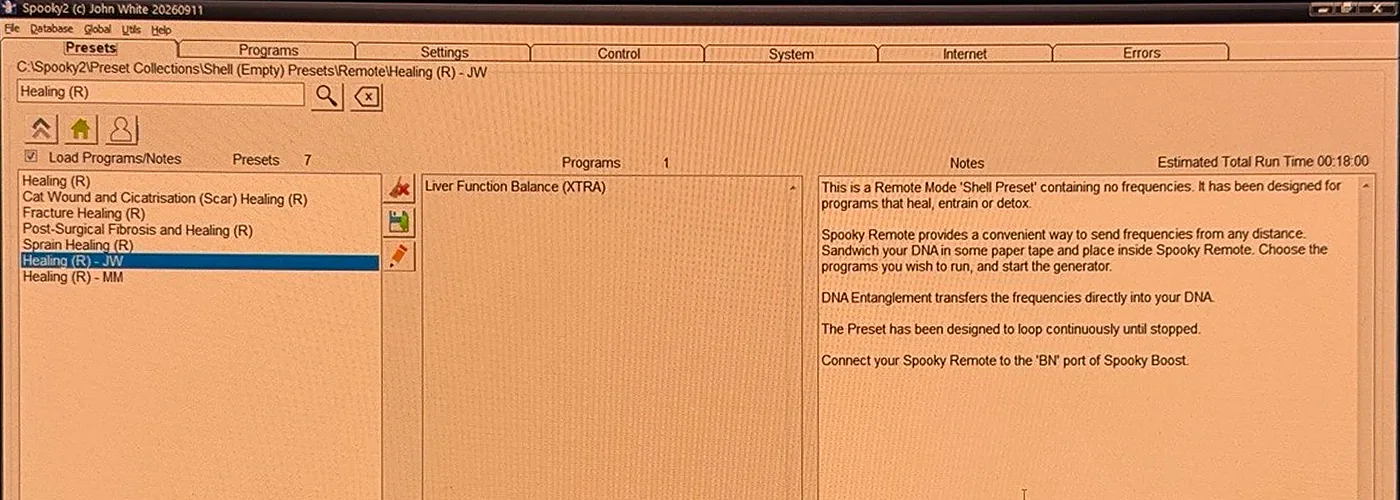
- Several presets can share a name. Click each Healing (R) - JW in turn and watch the folder path just above the search box. The one you want reads: C:\Spooky2\Preset Collections\Shell (Empty) Presets\Remote\Healing (R) - JW
- Now check you've got the right Healing (R) - JW. The Notes box on the right says it's "a Remote Mode 'Shell Preset' containing no frequencies." And the Programs box in the middle is empty.
- If the search doesn't find Healing (R) - JW, use the folders. Click the house icon under the search box, double-click Shell (Empty) Presets, double-click Remote, then click Healing (R) - JW.
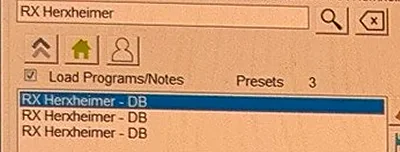
Keep in mind: the same preset name can sit in more than one folder. For example, RX Herxheimer - DB shows up three times, once from each of three different folders. The folder path above the search box tells you which copy you've clicked.
Part 3
Add Liver Function Balance (XTRA) to the shell
- Click the Programs tab.
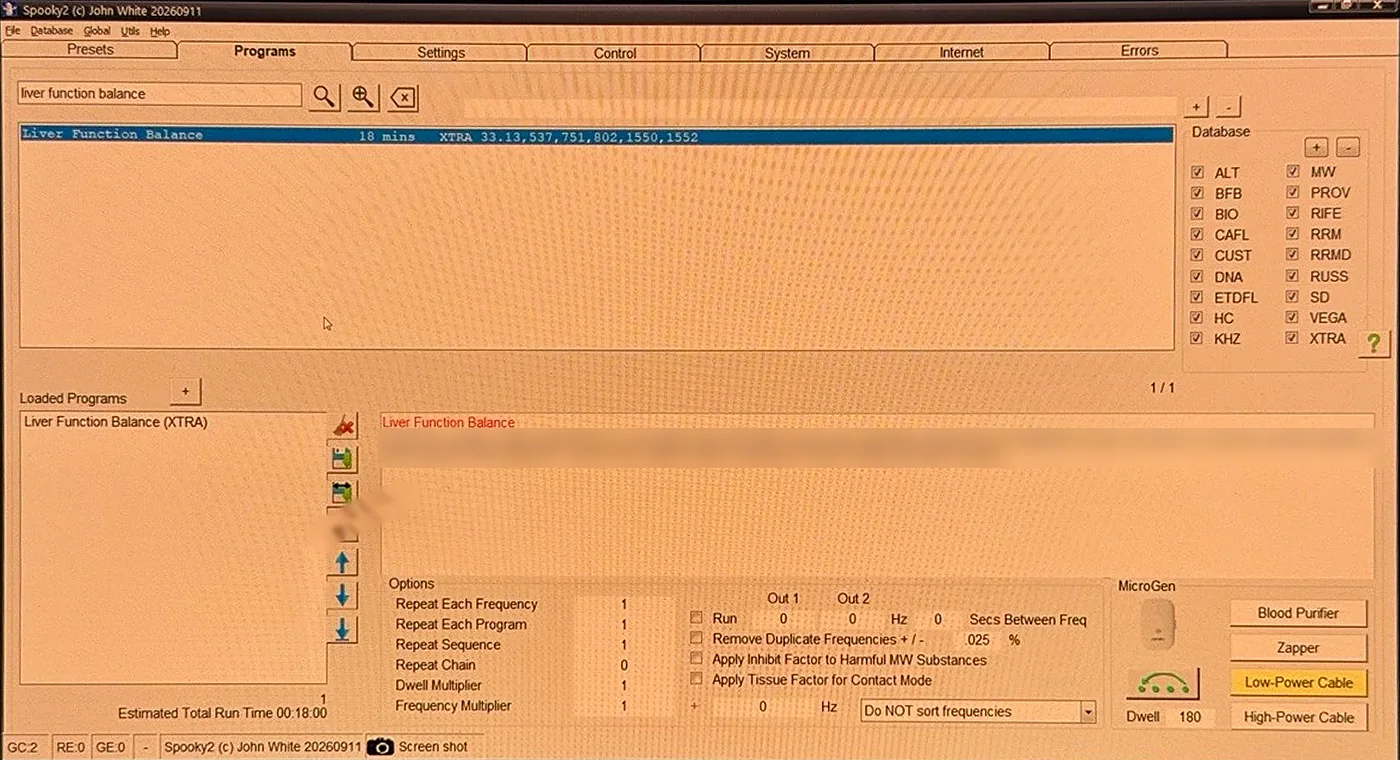
- Type liver function balance in the search box and click the magnifying glass.
- Check the results line. It should show Liver Function Balance, then 18 mins, then XTRA 33.13,537,751,802,1550,1552. Make sure it says XTRA, 18 mins and those six frequencies, because other Spooky2 databases can have programs with similar names.
- Double-click Liver Function Balance. It appears under Loaded Programs at the bottom left.
- Check that Liver Function Balance (XTRA) is the only program in Loaded Programs, and that Estimated Total Run Time reads 00:18:00.
- Look at Repeat Sequence in the Options area. It should be 1, so Liver Function Balance runs once and then stops. If it shows a different number, change it to 1.
Part 4
Turn the voltage down to 2.5 V
- Click the Settings tab.
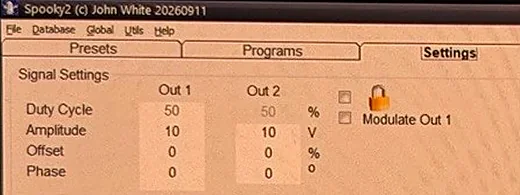
- Look at the top left, under Signal Settings. The Amplitude row is just under Duty Cycle, and it shows 10 for Out 1 and Out 2. Basically, amplitude is the voltage.
- Click the Out 1 box, change 10 to 2.5, and press the Tab key on the keyboard. Pressing Tab is what makes the new number stick.
- Do the same for the Out 2 box: change 10 to 2.5 and press Tab.
- Leave everything else on the Settings tab alone.
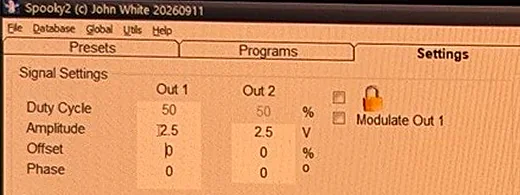
Now the reason for 2.5 V is that Spooky2's 2026 blog post on reactions names 1 V and 2.5 V as lower voltages for sensitive people. And the help center article from earlier says to lower the voltage for anyone with known kidney or liver issues.
Part 5
Start Liver Function Balance on Generator 2
- Click the Control tab.
- Tick Overwrite Generator.
- Click the box for Generator 2. That was box 3 on my setup, so use the port number you found in Part 1.
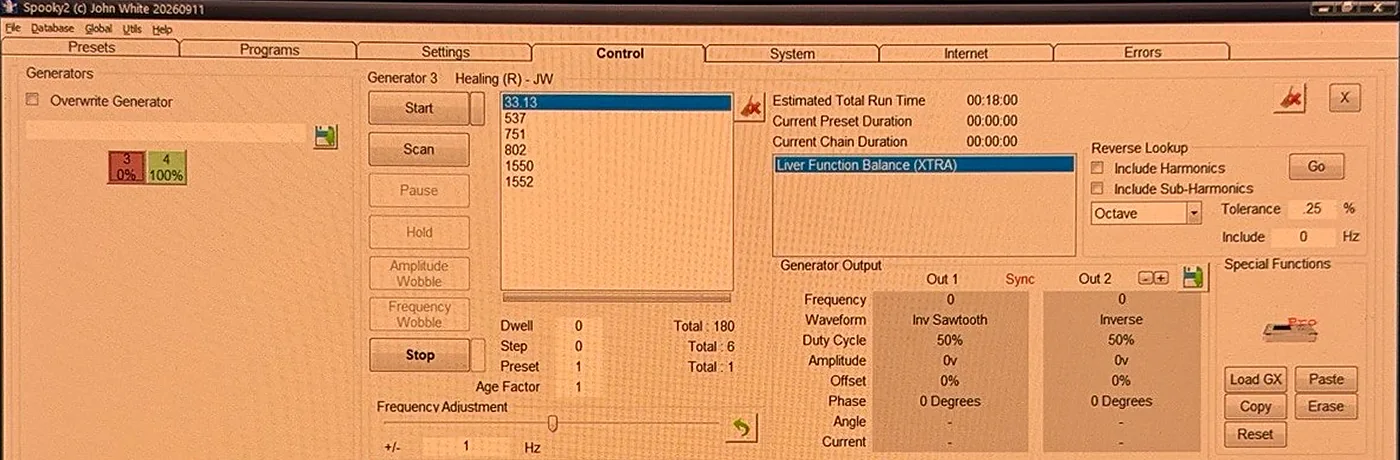
- The Generator 2 box turns red with 0%, which means Liver Function Balance is loaded but not started yet. The frequency list at the top shows the six frequencies, starting with 33.13. Two of the boxes labeled Total show 180 and 6. The 180 is the seconds per frequency, and the 6 is the number of frequencies.
- Click Start. The Generator 2 box turns green and its percentage starts climbing.
- Check the Generator Output area, just below the list that shows Liver Function Balance (XTRA). It should show Frequency 33.13 and Amplitude 2.5v.
How long and how often
- Run Liver Function Balance for one 18-minute pass a day for 3 to 5 days.
- Keep the Schumann Resonator running on Generator 1 the whole time. If you only have one Remote, restart the Schumann Resonator as soon as Liver Function Balance finishes each day.
- Change nothing else during those days.
- Each day, load and start Liver Function Balance again by repeating Parts 2 to 5, since it stops after one pass.
Something to note is that Spooky2 doesn't give a number of days for Liver Function Balance. So the 3 to 5 days is my suggestion. It's the same number of days Spooky2 gives Detox Maintenance, which is Spooky2's own next step after the Schumann Resonator.
How to tell Liver Function Balance is running
The reliable check is the GX Pro's own screen. Generator 2 on the GX Pro's screen should show the same frequency as Spooky2 on your laptop. That's 33.13 at the start of Liver Function Balance.
Keep in mind: the second Remote's red lights may not blink, or may not light at all. Basically, how the lights look depends on the frequency, the waveform and the amplitude. At 33 Hz the flicker is too fast to see, and at 2.5 V the lights can be too dim. Don't raise the voltage just to see the lights.
What to watch for, and what to do
Going well means you feel the same as you did on the Schumann Resonator alone, that day and the next. Keep a short note each day with the date, what ran and the voltage. Write down how you felt that evening, and again the next morning.
Not going well can look like the reaction signs Spooky2 lists: flu-like feelings such as chills, a mild fever, headaches, joint or muscle pain, or heavy sweating. Spooky2 also lists skin itching or breakouts, and fatigue.
Spooky2 says, "Always listen to your body." It also says to take a short break. And it says to drink plenty of water, which it puts at "half your body weight in ounces or more."
Here's what I'd do if you notice those signs:
- Stop Liver Function Balance.
- Keep the Schumann Resonator running on Generator 1, the same as before.
- Wait until you feel back to normal.
- Then try Liver Function Balance again at 1 V instead of 2.5 V. Or keep 2.5 V and run Liver Function Balance every other day.
And keep in mind, if you have severe or unusual symptoms, get checked by a doctor rather than pushing through.
Before adding anything else, finish your 3 to 5 days, and make sure you've had several days in a row on Liver Function Balance with none of the signs on Spooky2's list. Then you can add Kidney Function Normalize Stimulate (XTRA), which is one frequency, 625 Hz, for 3 minutes. It's named in the same help center article. To add it, search for Kidney Function Normalize Stimulate on the Programs tab and double-click it, so it joins Liver Function Balance under Loaded Programs. Then redo Parts 4 and 5 so Generator 2 gets both programs at 2.5 V. Keep everything else the same.
Other next steps people suggest, and why I wouldn't start with them
Detox Maintenance (R) - JK is Spooky2's own next step, but it could be a big one for a sensitive user. Detox Maintenance holds seven programs, and three are named after an infection or parasites. It's rated "Moderate" and runs at 20 V. And one pass took about 10 hours.
Terrain Low Power is rated "Low," but Spooky2's 2024 detox guide says the Low Power versions of the Terrain presets hold the same programs as Terrain Full Body. Terrain Full Body includes Streptococcus Pyogenes, Lymphangitis, Liver Flukes and intestinal parasite programs. So Terrain Low Power runs those same infection and parasite programs, just at lower power.
So ultimately, Liver Function Balance (XTRA) at 2.5 V could be a small, short next step, and the Schumann Resonator keeps running on Generator 1 the whole time. And hopefully this helps you pick your next program.
Sources
- "Smoother Healing: How to Manage Herx Reactions" (Spooky2 blog, 21 Apr 2026): the starting plan (Schumann Resonator, then Detox Maintenance, then Terrain), lower voltages like 1 V and 2.5 V, reaction signs, and water.
- "Why and How to Do Terrain Detox with Spooky2" (Spooky2 blog, 5 May 2026): the intensity table.
- "A Beginner's Guide to Detoxification: Understanding Terrain and More" (Spooky2 blog, 4 Oct 2024): the Low Power versions are the same as Terrain Full Body.
- Spooky2 help center: "What frequencies can strengthen the kidney and liver?" (2019): Kidney Function Balance, Kidney Function Normalize Stimulate and Liver Function Balance in a Healing shell preset, with a lower run time and voltage.
- "Remote & Waveform" (Spooky2 blog, 22 Oct 2015): the Remote's lights depend on frequency, waveform and amplitude.
- Spooky2 help center: "How can I lower the amplitude on remote mode so it stays like that until I want to change it back": set Amplitude on the Settings tab and press Tab.
- Spooky2 Rife Frequency List (January 2021, 544 entries): how often 727, 787, 880, 537, 751 and 1550 Hz appear.
- Preset files read directly from a Spooky2 20260911 install (C:\Spooky2\Preset Collections): Detox Maintenance (R) - JK, RX Herxheimer - DB, Healing (R) - JW, and the Terrain Protocol Liver Function presets.
- Spooky2 GX Pro Essential Kit product page: the kit includes 2 Boosts and 2 Remotes.
- "Peptide Programs: Frequently Asked Questions" (Spooky2 blog, 2026): peptide programs "do not work by killing pathogens."
- Spooky2 User's Guide (24 Jan 2025), in the software's Help menu or on the Spooky2 downloads page: the Killing (R) - JW and Healing (R) - JW shells.
- Program files read from the same Spooky2 20260911 install: Liver Function Balance (XTRA), Liver Support (CAFL), Liver 2 (PROV), Liver Support (BIO), Kidney Function Balance (XTRA), Kidney Function Normalize Stimulate (XTRA) and Lymph Drain Circulation (XTRA).
My take
Check what's inside a preset before you run it. Detox Maintenance sounds small, but it holds seven programs, runs at 20 V, and one pass took about 10 hours. Liver Function Balance (XTRA) is six frequencies and 18 minutes.
Change one thing at a time. Keep the Schumann Resonator on Generator 1 and add only Liver Function Balance on Generator 2. And if you have any questions, feel free to email me at contact@biofrequencybuddy.com. I look forward to reading as many messages as I can, and your questions help me improve these guides.