
I got that same result in all 14 scans I ran in one day, 5 on empty plates and 9 with saliva, across two presets and four settings. So before you trust a scan of your own, run the same scan on clean, empty plates. If the same hits show up with nothing on the plates, they're not coming from your sample.
Before you start
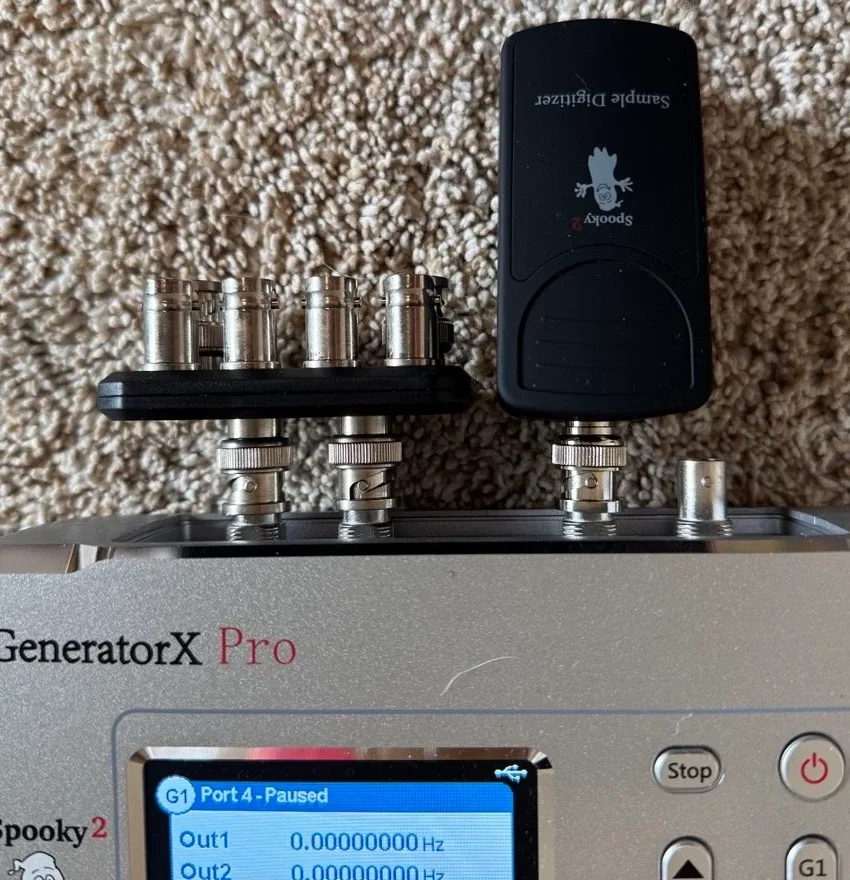
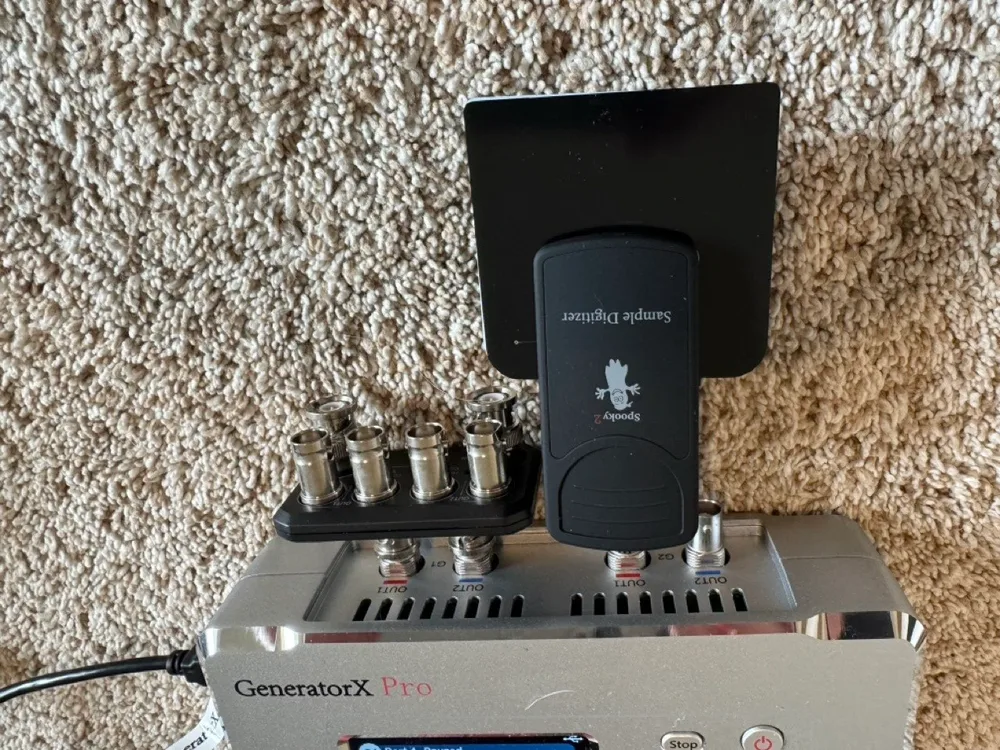
So this guide is for you if you have a GeneratorX Pro and the Spooky2 Sample Digitizer, and you want to run a scan. This guide also covers the low-frequency scan preset from Robert Bass, who wrote Spooky2's Healing BioScan Tips guide. The Sample Digitizer is $58 on Spooky2's store, and it's the small black holder that clips two plates together with your sample between them.
Parts 1 to 4 show how to run a Sample Digitizer scan properly, from cleaning the plates to finding the results window. Part 5 shows the empty-plate test, which is how you tell whether a scan's hits come from your sample or from the background. And Part 6 is what I found when I ran the empty-plate test on my own GX Pro.
On my GX Pro, the scan's hits came from the background, not my saliva, so the scan didn't give me any results I could use. Part 6 shows the numbers.
Keep in mind that was my own test, on my setup, in my room, with saliva. Your setup could give different results, and the empty-plate test in Part 5 is how you'd find out.
Part 1
What you need, and cleaning the plates
- A GeneratorX Pro. You'll need one of its generators free for the scan.
- The Sample Digitizer and its two plates. Spooky2 also sells Sample Digitizer Replacement Slides for $10 on its store.
- 99% isopropyl alcohol. I used Swan 99% Isopropyl Alcohol, and here's a store search for Swan 99% Isopropyl Alcohol, since Swan's maker doesn't have its own product page. Basically, 99% alcohol has almost no water in it, so it dries in seconds.
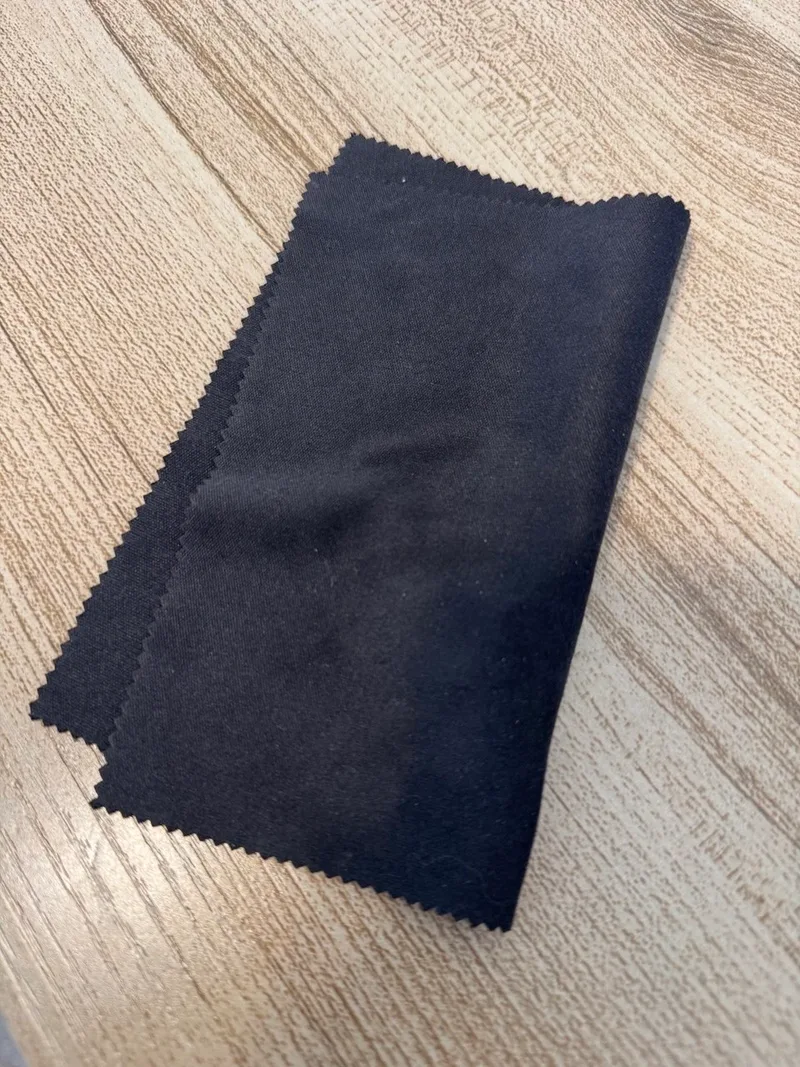
- A clean microfiber cloth. A glasses or screen cloth works well, and here's a store search for microfiber lens cleaning cloths.
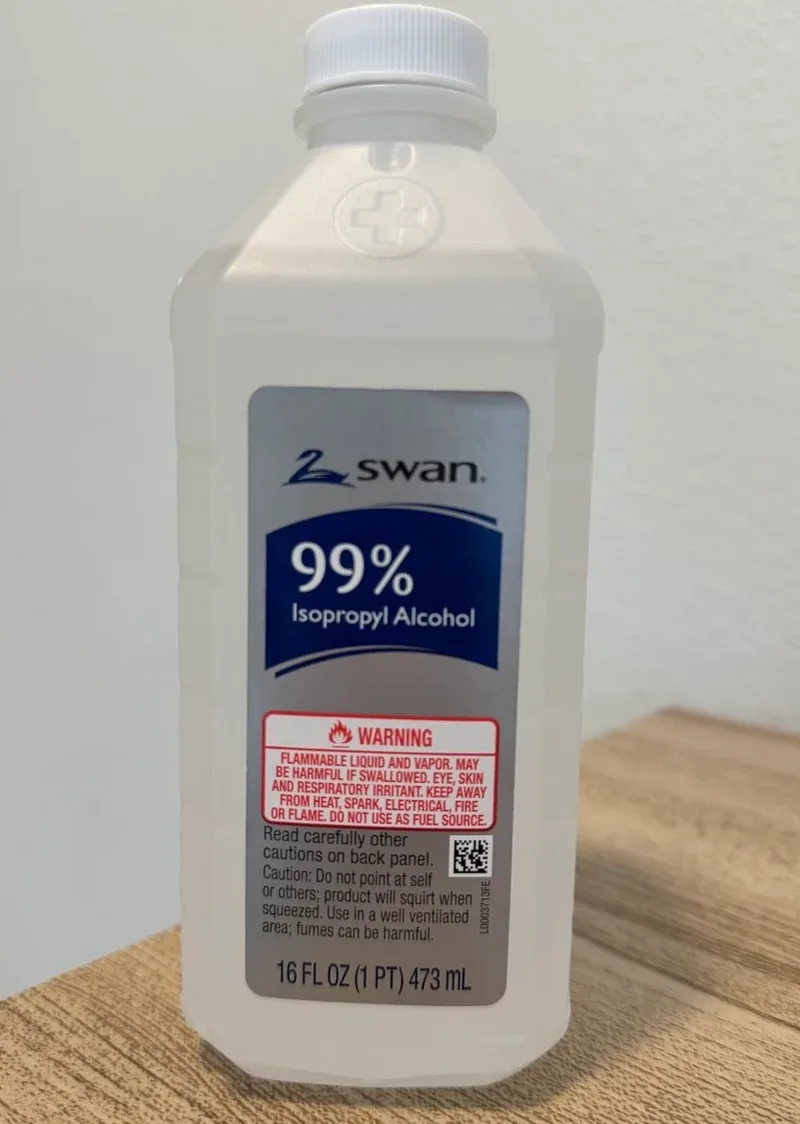
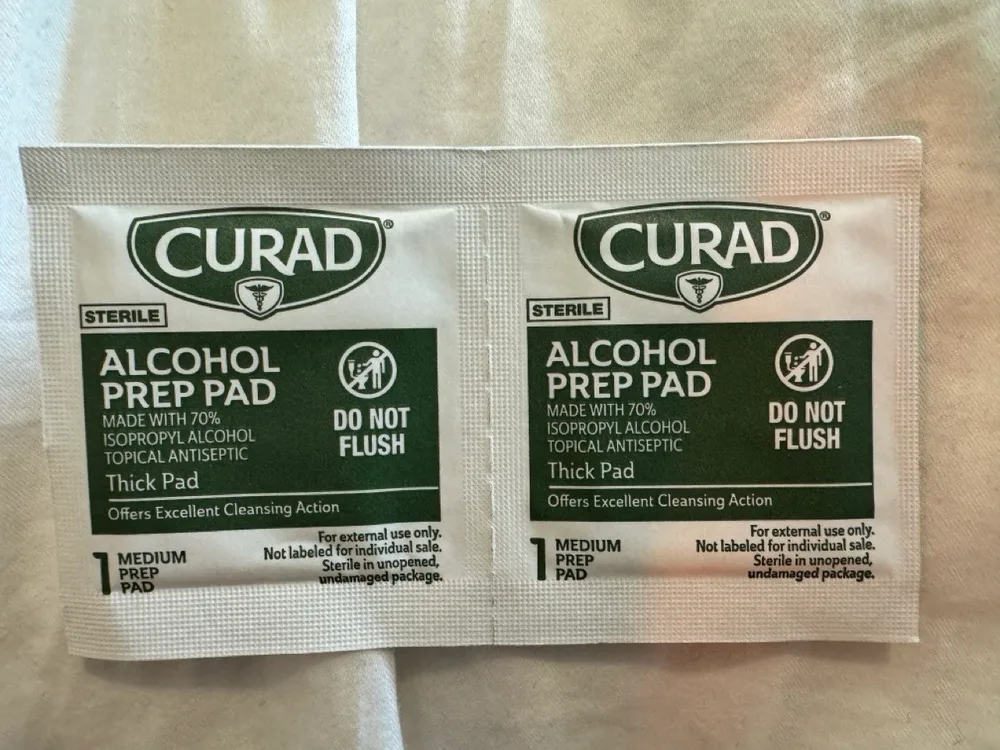
Now Curad alcohol prep pads work for one light wipe too. But they're 70% alcohol, so they're 30% water, and you'd let the plates dry for about 5 minutes. Spooky2 says to use high-percentage alcohol, and never water or hydrogen peroxide.
How to clean the plates
So I'd give even brand-new plates one light wipe with alcohol before the first scan. Here's how.
- Put a few drops of alcohol on the cloth, so the cloth is damp but not dripping. Never pour alcohol onto the plates. Too much liquid at the plate edges could ruin them.
- Wipe the inside of each plate. The inside is the side with the white printed border around the black "E". The other side has the metal contact strip and faces outward in the holder, so it doesn't need wiping.
- Let both plates dry until there's no wet sheen left.
- Check for fibers. Hold each plate up to a light and look across the black side at an angle, because a fiber between the plates could hold them apart. If you see one, puff it off rather than wiping it with a finger.
Hold the plates by their edges, and don't touch the black E. And use the same pair of plates for the empty scan and the saliva scan, so the only difference between the two readings is the sample.
A microfiber cloth that's been in a drawer holds onto dust, even though the microfiber itself doesn't shed much. My black cloth had a few white specks on it.
So shake the cloth out over a bin, then press tape or a lint roller over the side you'll wipe with. Or wash it in plain water with a little fragrance-free detergent and no fabric softener, then let it air-dry.
A cotton pad, pressed flat, is the next best thing to microfiber. Cotton swabs and paper towels aren't a good fit. A swab's small tip takes more strokes and catches fibers on the plate edges, and paper towels shed paper dust when you rub with them.
Part 2
Wiring the Sample Digitizer
- Plug the Sample Digitizer straight into Out 1 of a GX Pro generator, with no Boost in between. Out 1 is the only output with the sensing circuit, and a Boost adds noise to the reading.
- Pause any Remote that has your sample in it, like a Remote running the Schumann Resonator with your sample in its holder. Spooky2 calls that a DNA sample.
- Or let Spooky2 pause the other generators for you. On the System tab, tick Pause Generators During BFB. Basically, BFB is short for biofeedback, which is what Spooky2 calls a scan.
So after every scan, click the box of the generator that turned yellow and press Pause again. The same Pause button un-pauses it, and the box turns back from yellow.
Part 3
The sample
So I used saliva, because it's the easiest sample to collect. Bits of food in the saliva could add noise to a scan, and collecting it the same way each time makes one scan easier to compare with the next. So I followed the steps research labs use to collect saliva.
- Wait 1 hour after eating, drinking anything but water, brushing your teeth or chewing gum.
- Rinse your mouth with plain water, then wait about 10 minutes. First thing in the morning is the simplest time to do it.
- Spit into a clean spoon, then drip one small drop from the spoon onto the middle of the black E on one plate. Keep it well inside the white border.
- Flip the second plate over, so the two black Es face each other and the metal strips face out. Line up the edges and the two small holes, lower the plate straight down, and press gently once.
- Clip the plates into the Sample Digitizer. The two black dots on the holder fit into the two small holes on the plates. Give the plates a little wiggle so they sit in place.
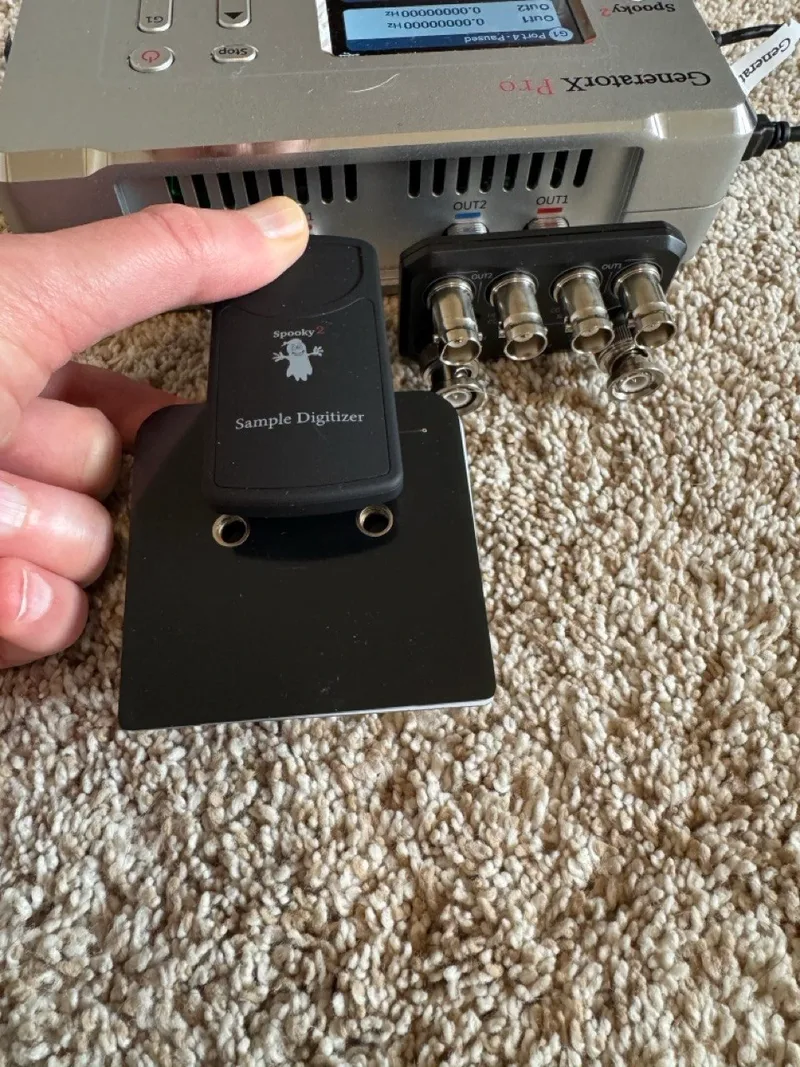
Now the two plates close almost completely, so the only gap between them is the thickness of the white printed border. So a little saliva goes a long way.
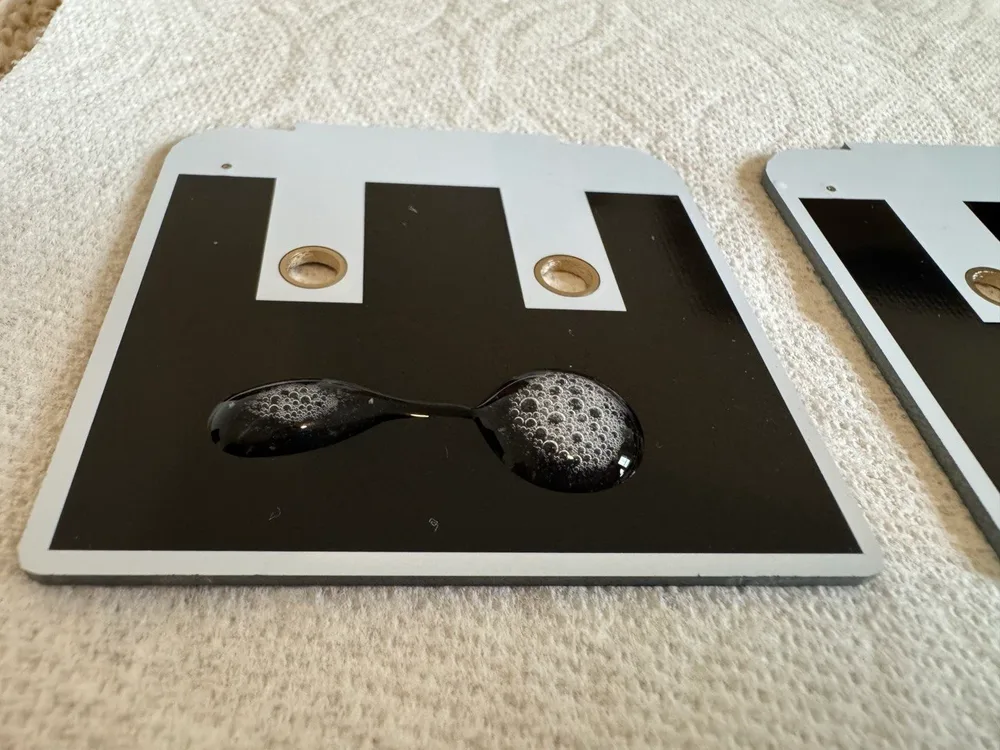
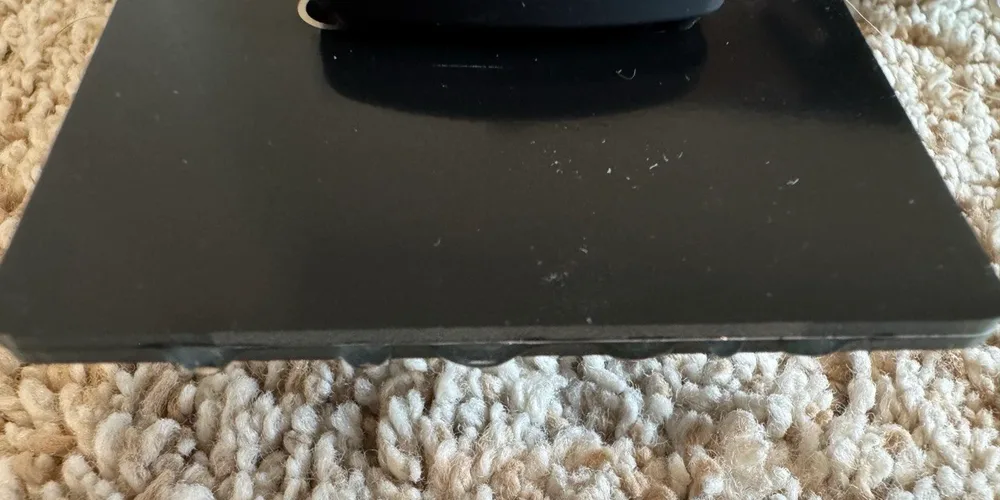
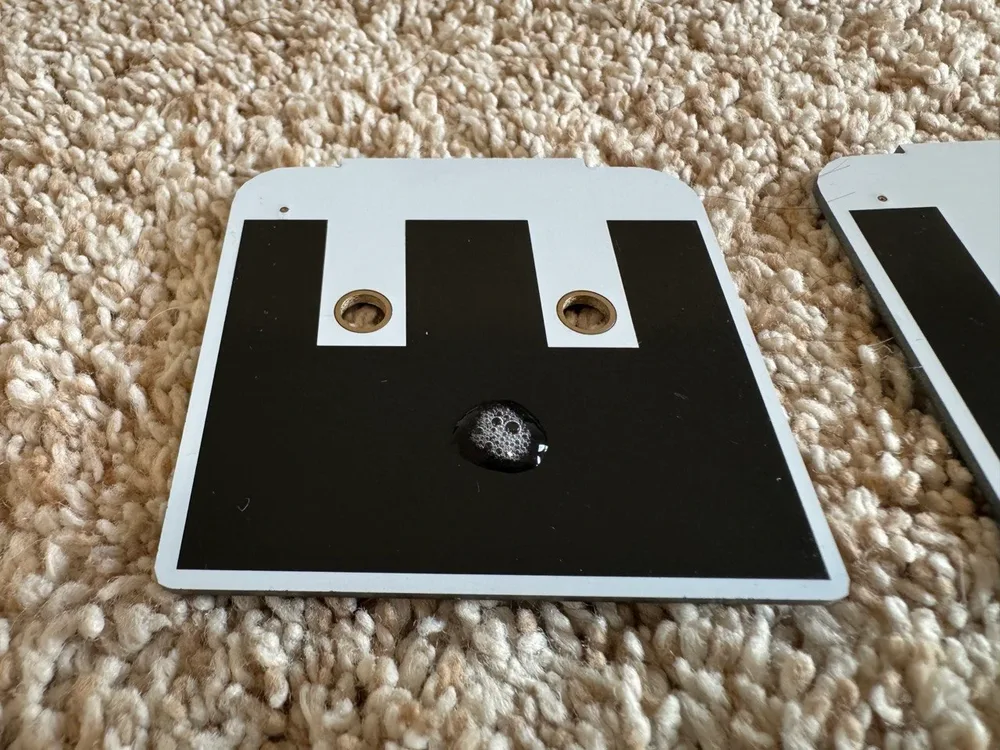
If any saliva does seep out, wipe the outside edge with a dry part of the cloth. Alcohol at the seam could wick in between the plates and mix with the sample. Bubbles in the saliva are normal.
A wet sample doesn't last more than about 8 hours, so scan it the same day. And you're free to move around during a Sample Digitizer scan. Keeping still only matters for scans through the Spooky Pulse finger clip or the TENS pads.
Cleaning the plates after a saliva scan
- Pull the plates apart and wipe the black side with 99% alcohol on the microfiber cloth until no saliva is left.
- Dried saliva takes two or three passes, so use a fresh part of the cloth each time.
- If saliva squeezed out, wipe the outside edges and the metal strips too.
- Let the plates dry black side up for a minute or two, then hold them up to the light again. If the black looks cloudy, wipe again.
And never use water on the plates.
Spooky2 says a pair of plates lasts about 5 to 10 uses with alcohol cleaning. Once the black side has lost its shine when you hold it to the light, throw the pair away. And use one pair of plates for each person.
Part 4
Running the scan
Load the preset
- On the Control tab, click the box for the generator the Sample Digitizer is on. Spooky2 numbers the boxes by port, so my Generator 2 shows up as box 3, and yours could be different. Part 7 of my GeneratorX Pro guide explains port numbers.
- On the Presets tab, open Biofeedback, then Sample Digitizer, and load General Biofeedback Scan - Low Frequency Healing (SD) - JW (RB). That's Robert's preset, and the GeneratorX Pro guide shows how loading a preset works if you're new to it.
- Go back to the Control tab. The preset's name shows at the top, after "Generator 3" on my screen.
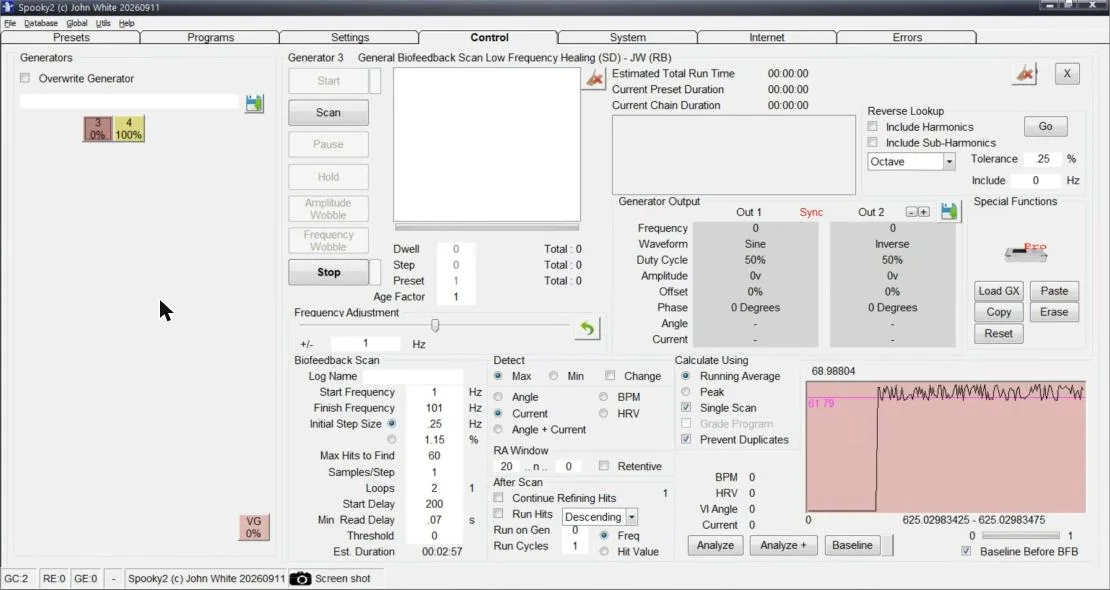
Where the settings are
The scan settings are in the bottom half of the Control tab. Here's what Robert's preset loads with.
- Biofeedback Scan box: the preset loads with Start Frequency 1 Hz, Finish Frequency 101 Hz and Initial Step Size .25 Hz. It also sets Max Hits to Find 60, Samples/Step 1, Loops 2 and Start Delay 200 seconds.
- Detect box: the preset sets Max and Current.
- Calculate Using box: the preset ticks Running Average, Single Scan and Prevent Duplicates.
- After Scan box: leave Run Hits unticked. Basically, Run Hits runs the scan's hit frequencies as a program as soon as the scan ends. So with it unticked, the scan only gives you a list, and nothing runs until you choose to.
- Log Name: type a name for each scan, like "empty 1" or "saliva 1". Spooky2 saves each scan's results under that name in C:\Spooky2\ScanData, so you can tell your scans apart later.
Two settings could make a scan more accurate, at the cost of time. Spooky2's founder, John White, suggests raising Samples/Step, for example to 10, so Spooky2 averages 10 readings at each frequency. And Dr. Jörg Prinz, who teaches Spooky2's biofeedback webinar, finds that detecting Angle + Current is a bit more accurate than Current alone.
Now Spooky2 estimated 29 minutes 33 seconds for my scan with both of those changes, but it finished in 10 minutes 35 seconds.
The baseline
Basically, a baseline is a reading Spooky2 takes with nothing on the plates, so it can tell the sample apart from the reading the equipment gives on its own. So you make the baseline with clean, empty plates in the Sample Digitizer.
- With empty plates clipped in, click Baseline, at the bottom right of the Control tab.
- The status bar at the bottom says Creating Baseline. About a minute later it says Baseline has been created. Click on green button to erase, and the small square beside the Baseline button turns green.
- Don't click that green square. Clicking it erases the baseline.
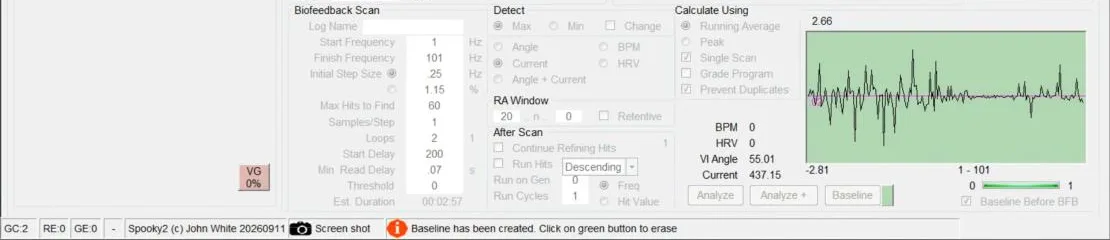
Now there's a checkbox called Baseline Before BFB, below the Baseline button, and Robert's preset loads with it ticked. In his April 2025 webinar, Dr. Prinz says that tick only uses the baseline you already made, and Robert's notes say a baseline is created before the scan.
On my Spooky2 version, 20260911, it worked the way Robert's notes describe. With the tick on, every scan started with "Creating Baseline" in the status bar and made a new baseline from whatever was on the plates. So once saliva was on the plates, the baseline was taken with the saliva in place. I left the tick on for every scan with Robert's preset, so my empty-plate scans and saliva scans were made the same way.
Something else to note is that clicking Baseline with Robert's preset made the baseline and then ran a full scan of the empty plates on its own. That scan's results window popped up when it finished.
Start the scan
Click Scan, the second button down on the left of the Control tab. While the scan runs, the generator's box says BFB.
Don't change settings or unplug anything in the middle of a scan. If you need to change something, stop the scan and start it again.
Find the results window
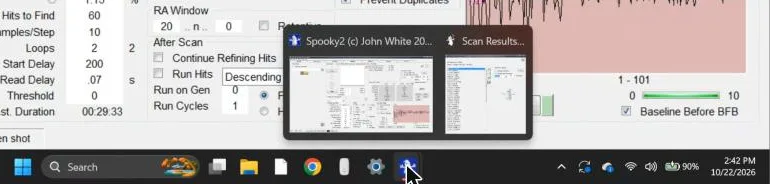
When the scan finishes, a Scan Results window opens with the hit frequencies and their values. But the Scan Results window can open behind the main Spooky2 window, or drop behind it as soon as you click the main window.
So if you don't see it, hover over the Spooky2 icon on the Windows taskbar. Two small windows pop up, Spooky2 and Scan Results. Click Scan Results to bring it to the front.
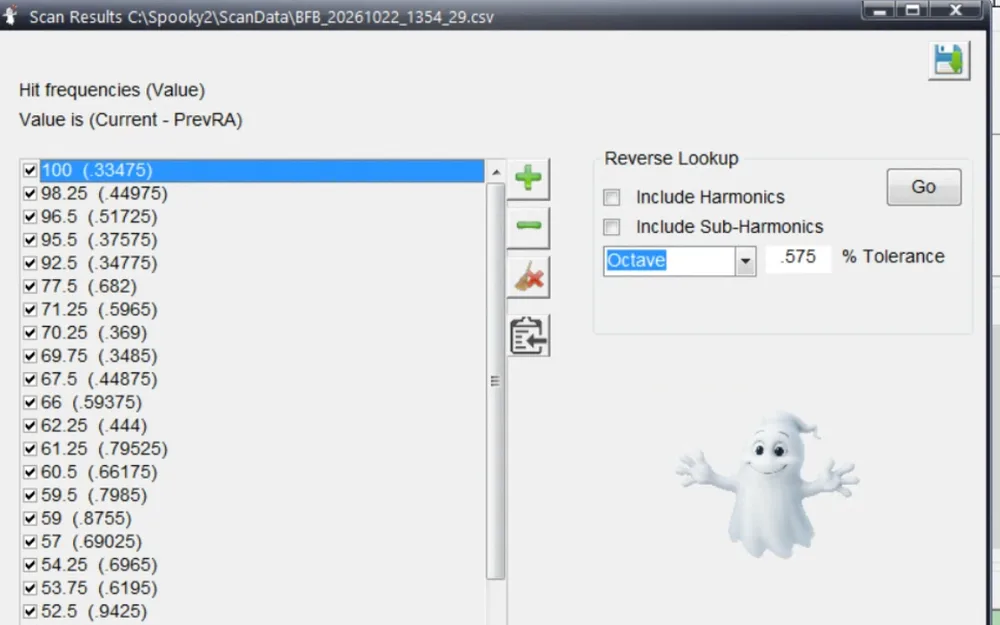
Your saved scans are also on the Programs tab. Search for BFB and scroll to the bottom of the list. If a scan is missing, click Database, then Refresh.
The Scan Results window also has a Reverse Lookup button, which matches each hit frequency to program names in Spooky2's databases. Basically, the match tolerance is how close a program's frequency has to be to count as a match. In the webinar, Dr. Prinz shows that changing the match tolerance took one frequency from 31 matches down to 0. And he says not to read the reverse lookup as a diagnosis.
Part 5
The empty-plate test
So the empty-plate test is simple. You run the same scan on clean, empty plates first, then see whether your sample's hits also show up with nothing on the plates. If they do, they're background from the equipment and the room, not your sample.
- Clean the plates the way Part 1 shows, and clip them in empty.
- Scan the empty plates. Type a Log Name like "empty 1" and click Scan. With Baseline Before BFB ticked, the scan makes its own baseline first, the way Part 4 shows.
- Add one small drop of saliva to the same plates, without changing any settings.
- Scan the saliva twice in a row, as "saliva 1" and then "saliva 2", without moving anything.
- Save or write down each list. The result files are in C:\Spooky2\ScanData, or you can copy each list from the Scan Results window.
- Count the matches. Count how many frequencies show up in both saliva scans, and how many show up in a saliva scan and the empty scan. Only count a frequency when it's exactly the same in both lists.
If your two saliva scans share clearly more frequencies with each other than either one shares with the empty plates, that's a sign the scan is reading your sample. But if a saliva scan shares as many with the empty plates, or more, most of the hit list is probably background from the equipment and the room.
How many matches come from luck alone
Now some matches happen by luck. Robert's scan steps from 1 to 101 Hz in .25 Hz steps, so it checks about 400 frequencies. And it picks 60 of them as hits.
So two 60-hit scans would share about 9 frequencies by luck alone, even if neither one read anything. And two 10-hit scans would share less than one frequency by luck, about a quarter of one on average. So with 10-hit scans, even 2 or 3 shared frequencies stand out.
Robert Bass's scan tips suggest keeping the hits that repeat from scan to scan. On my setup, the empty plates gave many of the same frequencies as the saliva scans, so the empty-plate scan is what tells you which repeats came from the sample.
Part 6
What I found
So I ran 14 scans in one day: 5 on empty plates and 9 with saliva. I used two presets, Robert's low-frequency scan preset and Spooky2's standard General Biofeedback Scan (SD) - JW, with four different settings. Every number below counts frequencies that were exactly the same in both scans.
Test 1: Robert's preset as written
These scans used the preset's own settings: Samples/Step 1, Current and 60 hits. My first saliva sample was too much and squeezed out at the edges.
| Scans compared | Same frequencies | Luck alone |
|---|---|---|
| Saliva 1 and saliva 2 | 17 | about 9 |
| Saliva 2 and empty 2 | 25 | about 9 |
| Saliva 1 and empty 2 | 16 | about 9 |
| Empty 1 and empty 2 | 4 | about 9 |
So saliva 2 shared more frequencies with empty 2 (25) than it did with saliva 1 (17).
Test 2: Samples/Step 10, with Angle + Current
This was the same preset with 60 hits, but with Samples/Step raised to 10 and Detect set to Angle + Current, the two changes from Part 4.
Saliva 3 was still my first, too-big sample. Then I cleaned the plates and scanned them empty for empty 3. For saliva 4 and 5, I used one small drop of fresh saliva, an hour after eating, with nothing squeezed out.
| Scans compared | Same frequencies | Luck alone |
|---|---|---|
| Saliva 3 and empty 3 | 30 | about 9 |
| Saliva 4 and saliva 5, the same drop | 22 | about 9 |
| Saliva 4 and empty 3 | 26 | about 9 |
| Saliva 5 and empty 3 | 15 | about 9 |
So two scans of the same small drop, saliva 4 and saliva 5, shared 22 frequencies with each other, while saliva 4 shared 26 with the empty plates.
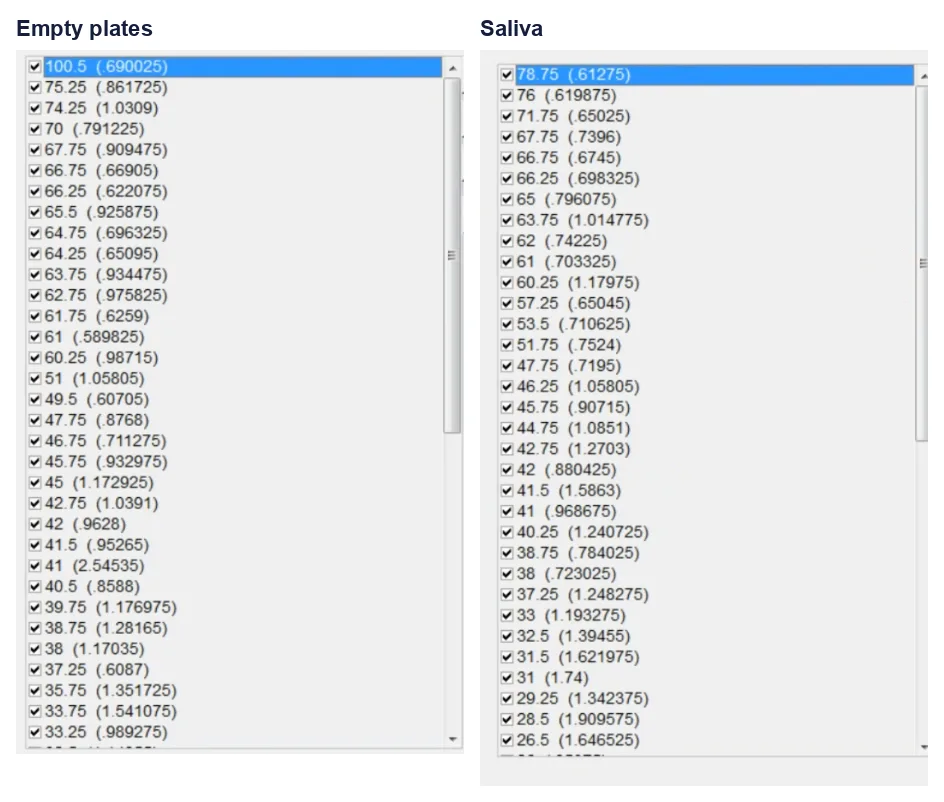
Test 3: Only 10 hits
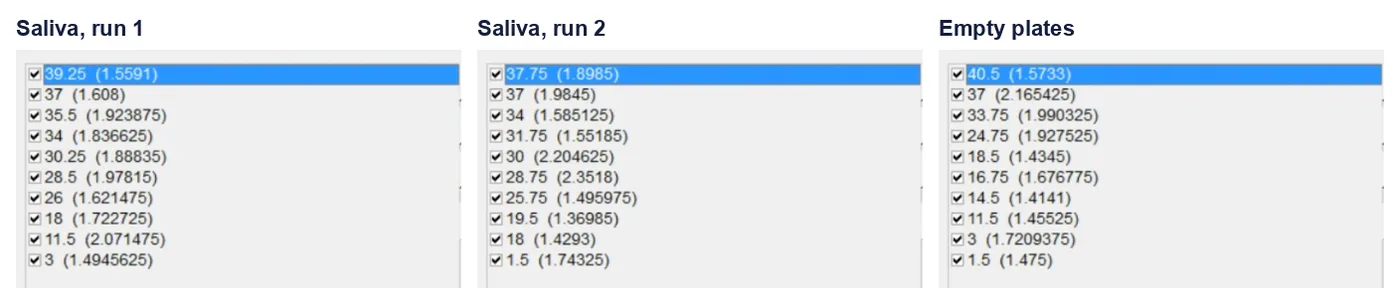
These used the same settings as Test 2, but with Max Hits to Find set to 10, on the same small drop of saliva. Empty 4 came after I cleaned the plates again.
| Scans compared | Same frequencies | Luck alone |
|---|---|---|
| Saliva 6 and saliva 7 | 3 (18, 34 and 37 Hz) | about a quarter of one |
| Saliva 6 and empty 4 | 3 (3, 11.5 and 37 Hz) | about a quarter of one |
| Saliva 7 and empty 4 | 2 (1.5 and 37 Hz) | about a quarter of one |
Saliva 6 and saliva 7 shared 3 frequencies, which is far more than the quarter of one you'd expect by luck.
But the empty plates came back with the same frequencies, or ones right next to them. 37 Hz showed up in all three Test 3 scans, saliva or empty. And the other two frequencies the saliva scans shared, 18 and 34 Hz, were each within half a hertz of an empty 4 hit, 18.5 and 33.75 Hz.
So on my setup, asking for fewer hits kept the strongest background frequencies, the ones that came back in scan after scan.
Test 4: Spooky2's standard scan
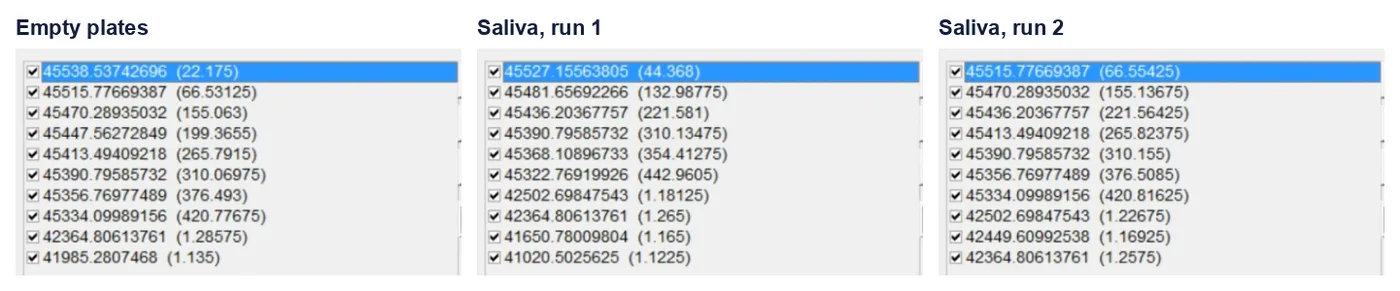
I ran Spooky2's standard General Biofeedback Scan (SD) - JW as it comes. It sweeps 41,000 to 1,800,000 Hz and finds 10 hits, with Baseline Before BFB unticked, 20 V and Run Hits off. Each run took about 36 minutes.
| Scans compared | Same frequencies |
|---|---|
| Saliva 8 and saliva 9 | 4 |
| Saliva 9 and empty 5 | 7 |
| Saliva 8 and empty 5 | 2 |
Every hit in all three runs fell between 41,000 and 45,600 Hz, at the very start of a sweep that goes all the way to 1,800,000 Hz. Most of the hits were neighboring frequencies with values that kept climbing, like 22, 66, 155, 199 and 265 on the empty plates.
Basically, on my setup that pattern looks like the reading settling down at the start of the sweep, rather than the scan finding something. So if your hits are all bunched at the bottom of the range with values that climb steadily, try the same scan on empty plates. Then you'll see if those hits show up there too.
What the four tests add up to
So for me, the Sample Digitizer scan didn't give me anything I could use. In all four tests, a saliva scan matched an empty-plate scan as closely as, or more closely than, it matched another scan of the same saliva.
Basically, the scan found the same frequencies whether my saliva was on the plates or not. So the hit lists told me about my equipment and my room, not my sample. That's why I didn't build a program from any of them, and why I wouldn't run one built from these hit lists.
Keep in mind this was one person's test, on one setup, on one day. It doesn't tell you what Robert Bass, John White or anyone else gets on their own equipment, and that's why the empty-plate test is worth running on yours.
What my test didn't cover
- Blood. John White and Dr. Prinz both say blood gives the best reading, and I only scanned saliva.
- Another room or time of day. The background could be different somewhere else, or at a different time of day.
- Spooky2's standard scan with a baseline. I ran the standard scan as it comes, with Baseline Before BFB unticked, so it ran with no baseline. Running the standard scan with a baseline could get rid of the start-of-sweep hits.
- The reverse lookup. I compared hit frequencies only, not the program names they match.
So ultimately, the empty-plate scan is the one extra step that tells you how much of a hit list is your sample, whichever preset you use. And hopefully this makes your next Sample Digitizer scan a lot easier to read.
Sources
- Spooky2 blog, "Spooky2 Biofeedback: Sample Digitizer Scan" (May 1, 2026): placing the sample on the black E, fitting the plates into the holder, cleaning with alcohol, and how long a wet sample lasts.
- Spooky2 on YouTube, "How to Use Spooky2 Sample Digitizer", with Spooky2 founder John White: Out 1 with no Boost, raising Samples/Step, and blood and saliva samples.
- Spooky2 course video, "How to Set Up Both Hardware and Software to Use Spooky2 Sample Digitizer".
- Robert Bass, "Healing BioScan Tips" (PDF), the section "Scanning Using GenX and The Sample Digitizer": the low-frequency scan preset, pausing a Remote running your DNA, and the baseline being created before the scan.
- Spooky2 webinar, "Biofeedback Scan", with Dr. Jörg Prinz (April 29, 2025): the baseline and its erase button, Angle + Current, the hidden results window, finding saved scans, the reverse lookup tolerance example, and plate care.
- Spooky2 help center: "How to use the Spooky2 Sample Digitizer", "Is it important to lay still", "How often do I need to run a baseline scan", "What happens if I connect Sample Digitizer to out 2" and "Do I need Boost when running hunt and kill".
- Spooky2 help center on cleaning the plates: article 360007870553, article 360011750033 (high-percentage alcohol, no water or hydrogen peroxide, and about 5 to 10 uses) and article 360011699653 (a user's warning about too much liquid on the edges).
- Spooky2 blog, "Spooky2 Sample Digitizer Guidelines" (2018): plate care.
- Saliva collection instructions from research labs: the University of Bristol T1D-DAB study sheet, the University of Vienna Salivette protocol, TCU's best practices for saliva collection and the Diagnostechs food panel kit instructions: waiting an hour after food, rinsing, and collecting in the morning.
- Cleaning a microfiber cloth: Zogics and The Home Depot.
- Spooky2 store pages for the GeneratorX Pro, the Sample Digitizer and the Sample Digitizer Replacement Slides.
- Spooky2 software, version 20260911, available on the Spooky2 downloads page: the steps and screenshots on this page.
- My own scan log from October 22, 2026: every hit list and every comparison on this page.
My take
Scan empty plates before you trust a hit list. It costs one extra scan, and on my setup it showed that 37 Hz came up whether saliva was on the plates or not.
Use one small drop. The plates close almost completely, so my first sample, about 3 or 4 drops' worth, squeezed out the sides.
And if you have any questions, feel free to email me at contact@biofrequencybuddy.com. I look forward to reading as many messages as I can, and your questions help me improve these guides.