
So these are the Spooky2 problems I ran into on my GeneratorX Pro, or GX Pro, and how to fix each one. The GX Pro is $650 on Spooky2's store. Each section shows what you see on the screen, what's going on, and how to fix it.
So I'd start with the generator boxes, because their colors tell you a lot about what Spooky2 is doing.
How to read the generator boxes
The generator boxes sit at the top left of the Control tab, under Generators. Each box is one generator, and the color of the box tells you what that generator is doing.
- Spooky2 numbers each box by the laptop's port number, not 1 and 2. On my GX Pro, the GX Pro's own screen shows G1 as port 4 and G2 as port 3. So on my Control tab, box 4 is Generator 1 and box 3 is Generator 2. Check your own GX Pro's screen, because your port numbers may be different.
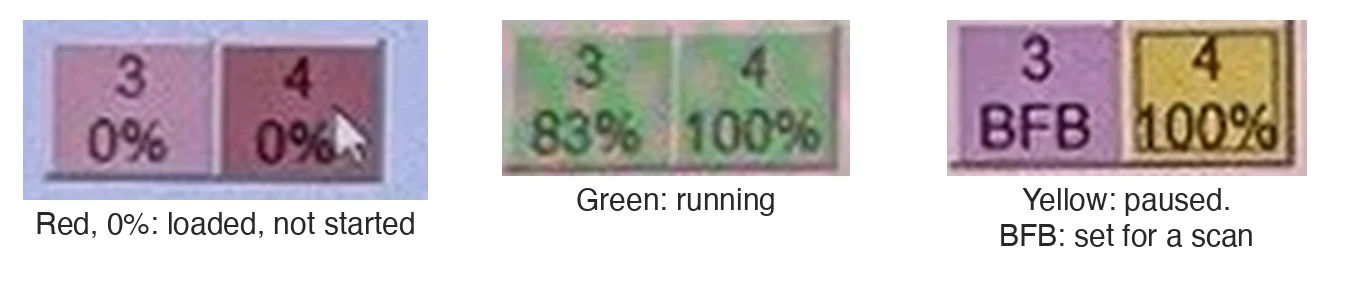
- Red with 0% means a program is loaded but not started. The amplitude shows 0v.
- Green with a climbing percentage means the generator is running.
- Yellow means the generator is paused. The output shows 0 Hz and 0v, and the timer stops.
- "BFB" instead of a percentage means that generator is set up for a biofeedback scan. The Test Mode section just below explains what a biofeedback scan is.
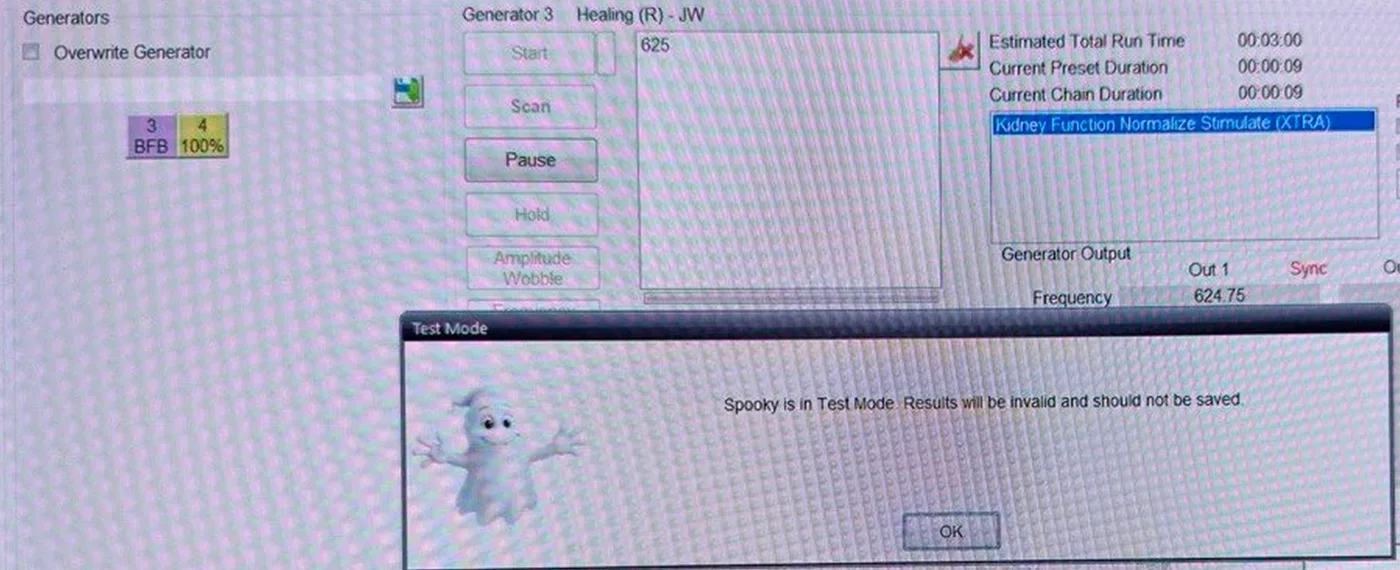
"Spooky is in Test Mode" popup and a yellow generator
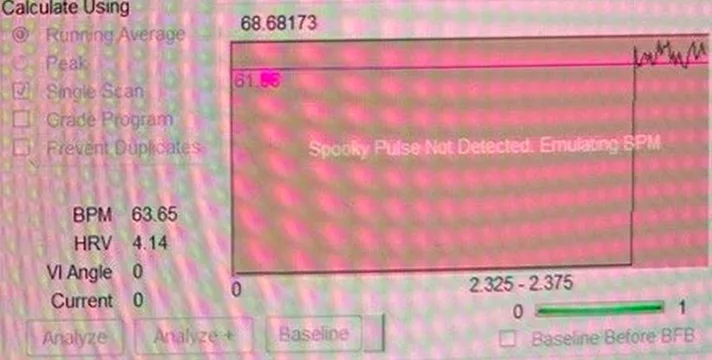
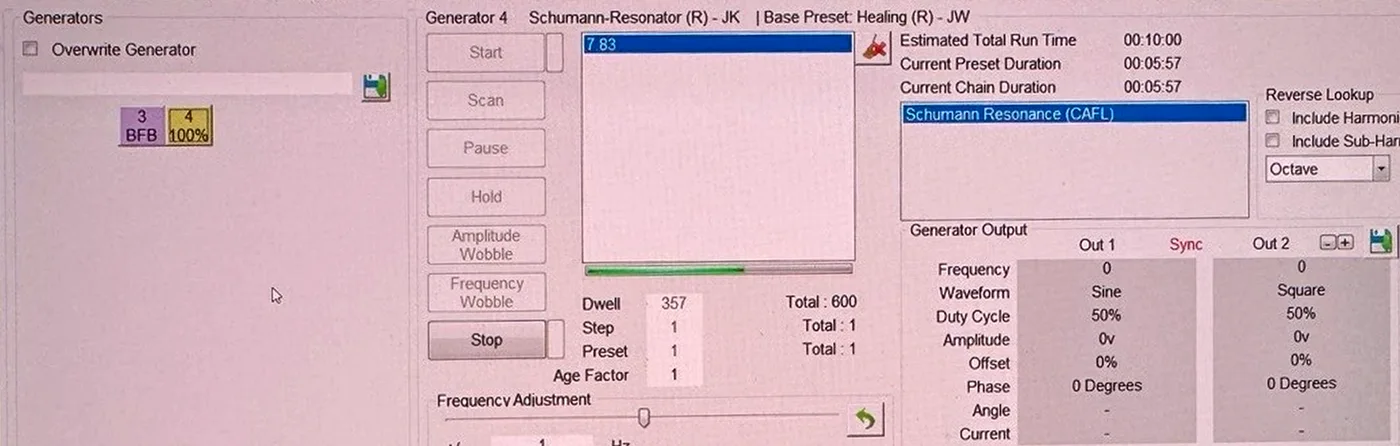
What you see: you meant to start a program, and a popup says "Spooky is in Test Mode. Results will be invalid and should not be saved." The generator box says BFB instead of a percentage.
The heartbeat graph at the bottom right of the Control tab turns pink and says "Spooky Pulse Not Detected. Emulating BPM," with a made-up heartbeat line.
And your other generator, for example the one running the Schumann Resonator, turns yellow and stops sending frequencies to its Remote.
What's going on: a biofeedback scan started instead of your program. Basically, a biofeedback scan sweeps through frequencies while the Spooky Pulse reads your heartbeat. The Spooky Pulse is Spooky2's heartbeat sensor, and it's $58 with the finger clip on Spooky2's store. There are two common reasons a scan starts by mistake:
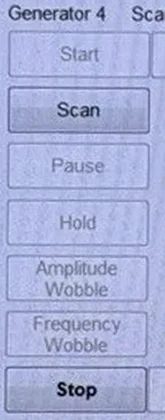
- You clicked Scan instead of Start. On the Control tab, Start is the top button in the left column, and Scan is directly below it, so they're easy to mix up.
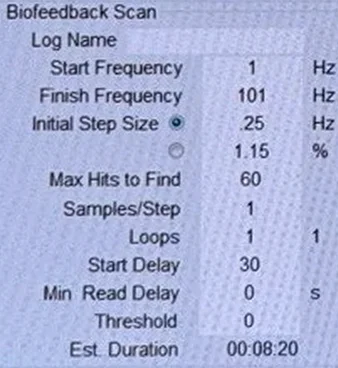
- The generator box still holds scan settings from an earlier scan. In that case the Biofeedback Scan section on the Control tab shows Start Frequency 1, Finish Frequency 101 and Max Hits to Find 60.
A scan needs a heartbeat from the Spooky Pulse. With no heartbeat coming in, Spooky2 goes into Test Mode and draws a made-up heartbeat. Pause Generators During BFB is a box on the System tab, and it's ticked by default. With that box ticked, every other generator pauses while the scan runs, and that's why your other generator turns yellow.
How to fix it:
- Click OK on the popup.
- Click the generator box that says BFB and click Stop.
- If the heartbeat graph is still on, click inside the graph once to turn it off.
- Click your other generator's box. If it's still yellow, click Stop, then Start, and check that its frequency is back in Generator Output.
- If a box still says BFB, close Spooky2 completely and open it again. Then reload each preset and program. Keep in mind, reloading a shell like Healing (R) - JW resets the voltage to 10 V and Repeat Chain to 0, so set the voltage and Repeat Chain again.
- Start your program with the top button, Start.
A program in the Healing (R) - JW shell that should run 18 minutes ran for hours
What you see: Liver Function Balance in the Healing (R) - JW shell should take 18 minutes. But the generator box keeps going and starts over. My Liver Function Balance run went about 12 hours.
What's going on: basically, a shell is an empty preset that you add a program to. The Healing (R) - JW shell loads with Repeat Chain 0, and in Spooky2 a 0 means "repeat until stopped." You can see this in the shell's notes on the Presets tab, which read "designed to loop continuously until stopped." And setting Repeat Sequence to 1 doesn't stop the shell from repeating.
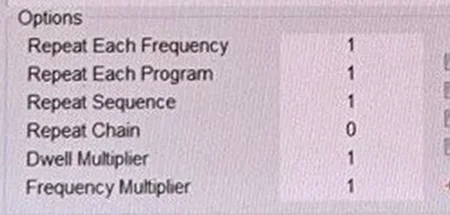
How to fix it: before you click Start, go to the Programs tab. The Options section is in the bottom half, just right of Loaded Programs. Change Repeat Chain from 0 to 1 and press Tab. Then the generator box should reach 100% and stop after one pass.
Estimated Total Run Time can be hours too short
What you see: a preset runs far longer than Estimated Total Run Time says. When I ran Detox Maintenance (R) - JK, Estimated Total Run Time said 4 hours 56 minutes, but one pass took about 10 hours. After 8 hours 29 minutes, box 3 was only at 83%.
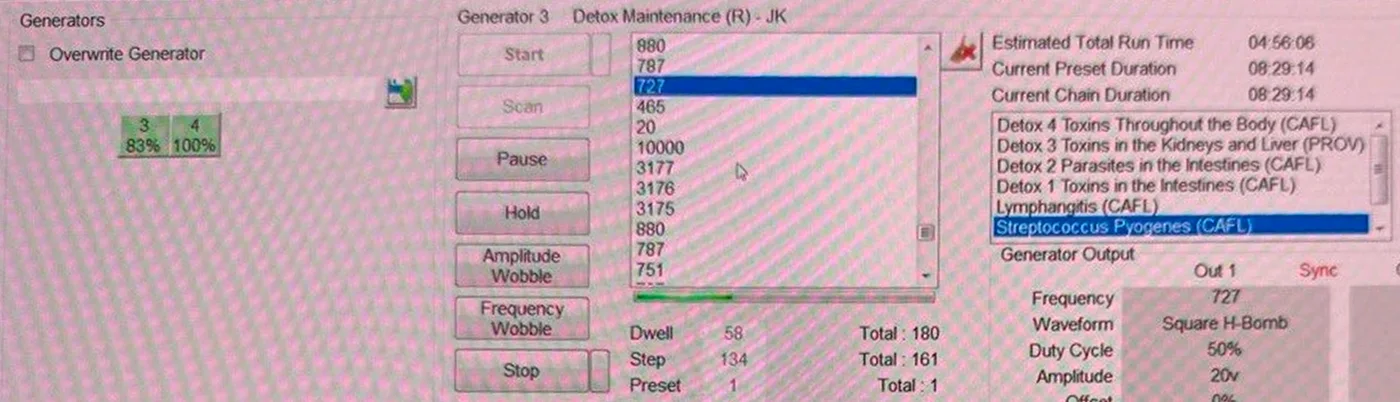
What's going on: basically, the estimate comes from the frequency lists stored in the preset file. But when Detox Maintenance ran, one program, Streptococcus Pyogenes (CAFL), loaded 161 frequencies at 180 seconds each. That's about 8 hours for Streptococcus Pyogenes alone. So one pass took about 10 hours, which is about 5 hours longer than the estimate on screen.
How to fix it: while a program runs, check the Total boxes next to Dwell and Step on the Control tab. The Total next to Dwell is the seconds per frequency, and the Total next to Step is the number of frequencies. And before you run a preset overnight, read what's inside it. To see how to read what's inside a preset, read the section How to judge any program before you run it. It's in my guide "After the Schumann Resonator: the next program for sensitive users."
The heartbeat graph isn't on the System tab
What you see: older Spooky2 instructions say to click the heartbeat graph on the System tab, but there's no graph there.
What's going on: in Spooky2 version 20260911, the System tab only shows "Spooky Pulse detected." under Connected Hardware. The System tab is also where you'll find the Pause Generators During BFB box from the Test Mode section above.

How to fix it: the heartbeat graph is the white box at the bottom right of the Control tab, next to BPM, HRV, VI Angle and Current. Click the graph once to watch your pulse with no frequencies running. The graph's label changes to "Click Graph To Stop Pulse Display." Click the graph again to stop.
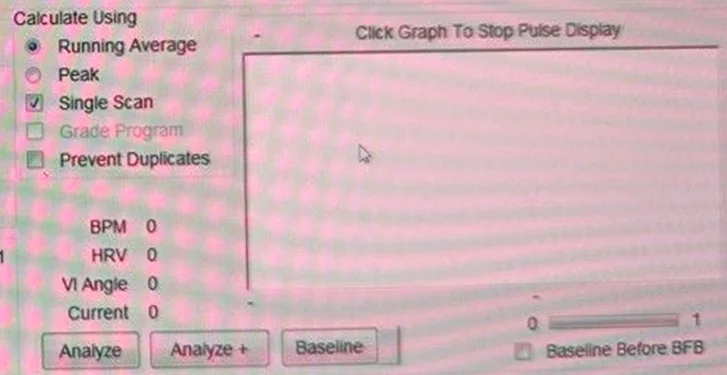
"Please click the graph to stop pulse display" when you click Scan or Start
What you see: a popup called Graph In Use that says "Please click the graph to stop pulse display."
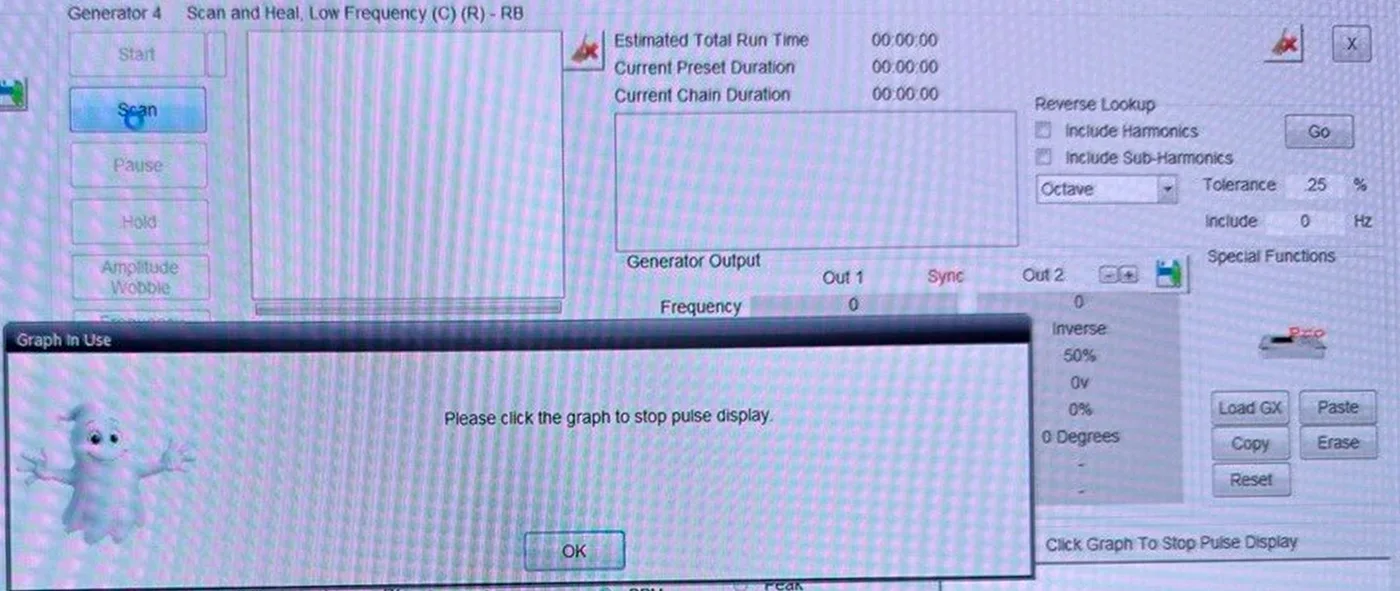
What's going on: basically, Spooky2 won't start a program or a scan while the heartbeat graph is on.
How to fix it: click OK, click inside the heartbeat graph to turn the graph off, then click Start again.
Spooky2 says the Spooky Pulse is detected, but the scan never moves past 1 Hz
What you see: the System tab says "Spooky Pulse detected." The red light on the Spooky Pulse blinks with your heartbeat. But BPM stays at 0, the heartbeat graph stays empty or says "Spooky Pulse Not Detected. Emulating BPM," and the scan's frequency stays at 1.000000.
What's going on: Spooky2 sees the Spooky Pulse, but it isn't getting heartbeat readings from the Spooky Pulse. A scan only moves to the next frequency after a heartbeat reading.
How to fix it: these are the checks Spooky2 gives.
- Plug the Spooky Pulse in before you open Spooky2.
- Plug the Spooky Pulse straight into the laptop, not into a hub.
- Put on the Spooky Pulse and check that the green light stays on and the red light blinks.
- Use the short mini USB connector that came with the Spooky Pulse instead of the USB cable.
- Restart the whole computer.
- For the finger clip, use your left middle finger. The black side of the sensor goes on top, over the nail, and both inside dimples should touch your skin.
Spooky2 support's answer to my question was that Pulse scans are designed to use TENS pads along with the Spooky Pulse. Basically, TENS pads are sticky pads, and for a Pulse scan they go on the right wrist and left ankle. The Spooky2 Large TENS Pad is $20 on Spooky2's store.
Spooky2 shows that setup in its video, "How to Set up Both Hardware and Software to Do a Full System Scan". And its videos "Why Isn't Your Pulse Unit Detected When Doing Biofeedback Scan" and "How to Get Better Results from the Pulse Finger Sensor" walk through the checks above.
The Remote's lights don't blink
What you see: the lights on the Spooky2 Remote look steady, dim or off while a program runs.
What's going on: at a low voltage like 2.5 V, or at faster frequencies like 33 Hz and up, the Remote's lights may look steady, dim or off. Basically, the lights are powered by the signal itself, so how they look depends on the frequency, the waveform and the voltage. The Spooky2 Remote v2.0 is $48 on Spooky2's store.
How to fix it: check the GX Pro's own screen instead of the lights. If the GX Pro's screen shows the generator at the same frequency as Spooky2 on your laptop, there's nothing to fix.
Searching a program name on the Presets tab finds presets for other modes
What you see: you search Liver Function on the Presets tab, and the results are Terrain Protocol presets marked Coil, (C), (L), (P) and (S).
What's going on: those letters stand for Contact, Laser, Plasma and Scalar, which are other ways of running a program besides the Remote. None of those Terrain Protocol presets is for the Remote. And the same preset name can sit in several folders. For example, RX Herxheimer - DB is in three folders.
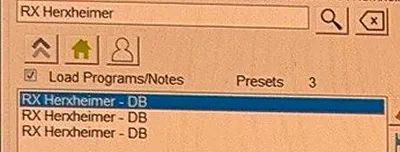
How to fix it: to run a single program in Remote mode, load the empty Healing (R) - JW shell on the Presets tab, then add the program on the Programs tab. And when a name shows up more than once, click each one and read the folder path above the search box to see which copy you clicked.
The voltage went back to 10 V and Repeat Chain went back to 0
What you see: you set the voltage to 2.5 V yesterday, and today Amplitude shows 10 again. Repeat Chain is back at 0 too.
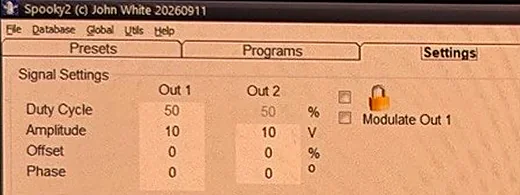
What's going on: the voltage and Repeat Chain belong to the loaded preset. Each time you load the Healing (R) - JW shell, or reopen Spooky2 and reload it, the shell comes back at 10 V and Repeat Chain 0.
How to fix it: set the voltage and Repeat Chain again every time you load the shell. And to save time, once your program, voltage and Repeat Chain are set, you can save your set as your own preset. My guide How to save your own Spooky2 preset shows how. Either way, check the voltage and Repeat Chain each time you load your preset.
The run time jumped to over 2 hours: two kidney programs with almost the same name
What you see: the daily liver, kidney and lymph set, which should take 27 minutes, shows Estimated Total Run Time 02:15:00. And the Control tab lists frequencies you didn't expect, like 1.1, 1.19, 6.29, 8, 10 and 20, with Total : 44 instead of Total : 8.
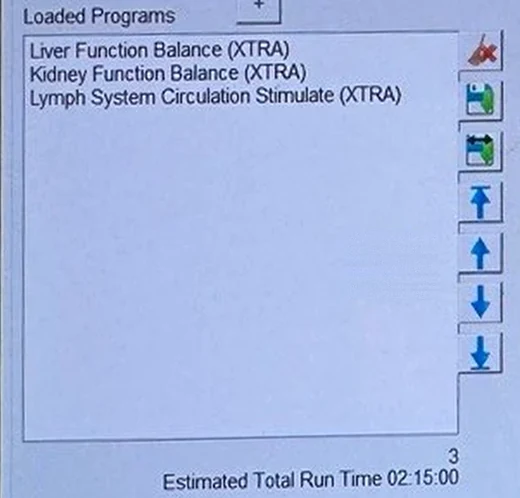
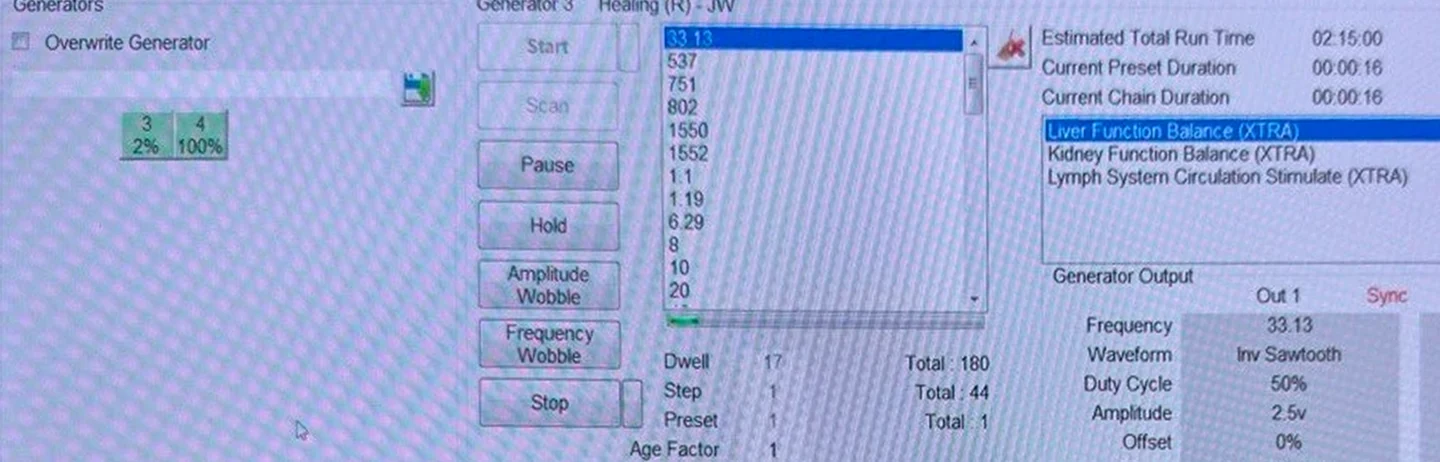
What's going on: searching kidney function on the Programs tab shows two programs with almost the same name. Kidney Function Balance (XTRA) has 37 frequencies, including 880 and 10000 Hz, and runs about 1 hour 51 minutes. Kidney Function Normalize Stimulate (XTRA) is one frequency, 625 Hz, for 3 minutes. It's easy to double-click the wrong one.
How to fix it:
- Click Stop on the generator running the set.
- On the Programs tab, click Kidney Function Balance under Loaded Programs, then click the red X at the top of the column of buttons to the right.
- Search kidney function normalize and double-click Kidney Function Normalize Stimulate.
- Move Kidney Function Normalize Stimulate with the blue arrows so it sits between Liver Function Balance and Lymph System Circulation Stimulate.
- Check that Estimated Total Run Time reads 00:27:00, then click Start again.
Before you click Start on any set, check Estimated Total Run Time on the Programs tab and the frequency count (Total) on the Control tab. My daily liver, kidney and lymph set guide shows the right set: 00:27:00 and Total : 8.
What a lot of these Spooky2 problems come down to
So ultimately, a lot of these problems come down to a button that's easy to mix up, a setting the Healing (R) - JW shell puts back, a program name that's almost the same as another, or a run time on screen that's wrong. And hopefully this saves you some time the next time your Spooky2 screen looks off.
Sources
- Spooky2 Quick Guide (27 Jul 2026) and User's Guide (24 Jan 2025), in the software's Help menu or on the Spooky2 downloads page.
- Spooky2 help center, Test Mode during a pulse scan.
- Spooky2 help center, "Why No Spooky Pulse Detected".
- Spooky2 videos: "Why Isn't Your Pulse Unit Detected When Doing Biofeedback Scan", "How to Get Better Results from the Pulse Finger Sensor" and "How to Set up Both Hardware and Software to Do a Full System Scan".
- Spooky2 blog, "Spooky Pulse Q&A".
- Spooky2 blog, "Remote & Waveform": the Remote's lights depend on frequency, waveform and amplitude.
- Spooky2 store pages for the GeneratorX Pro, Spooky Pulse with finger clip, Remote v2.0 and Large TENS Pad.
- Spooky2 support, reply to my question about Pulse scans (October 2026): Pulse scans are designed to use TENS pads.
- Spooky2 software, version 20260911, on a GeneratorX Pro: every screen on this page, and the fixes for Test Mode, Repeat Chain, the run time, the heartbeat graph, the Graph In Use popup, the voltage and the two kidney programs with almost the same name.
My take
Check the generator boxes first. Red, green, yellow or BFB tells you most of what's going on before you read anything else.
Set Repeat Chain and the voltage every time you load a shell. And if you hit a problem that isn't here, feel free to email me at contact@biofrequencybuddy.com. I look forward to reading as many messages as I can, and your questions help me improve these guides.