
Before you start
This guide picks up where After Liver Function Balance: adding the kidney program ends. So it assumes the Schumann Resonator is running on Generator 1. It also assumes you've run Liver Function Balance (XTRA) and then Kidney Function Normalize Stimulate (XTRA) in the Healing (R) - JW shell on Generator 2, and both went fine.
Parts 1 to 6 below show every click, from stopping Generator 2 to checking that the whole set stops after one 27-minute pass. Before the steps, I show why I'd add Lymph System Circulation Stimulate as the third program, so you can see if it looks like the right next step for you too.
The three programs in the daily set
Each of the eight frequencies in the set runs for 180 seconds, which is 3 minutes per frequency.
| Order | Program | Frequencies | Time |
|---|---|---|---|
| 1 | Liver Function Balance (XTRA) | 33.13, 537, 751, 802, 1550 and 1552 Hz | 18 minutes |
| 2 | Kidney Function Normalize Stimulate (XTRA) | 625 Hz | 3 minutes |
| 3 | Lymph System Circulation Stimulate (XTRA) | 15.19 Hz | 6 minutes |
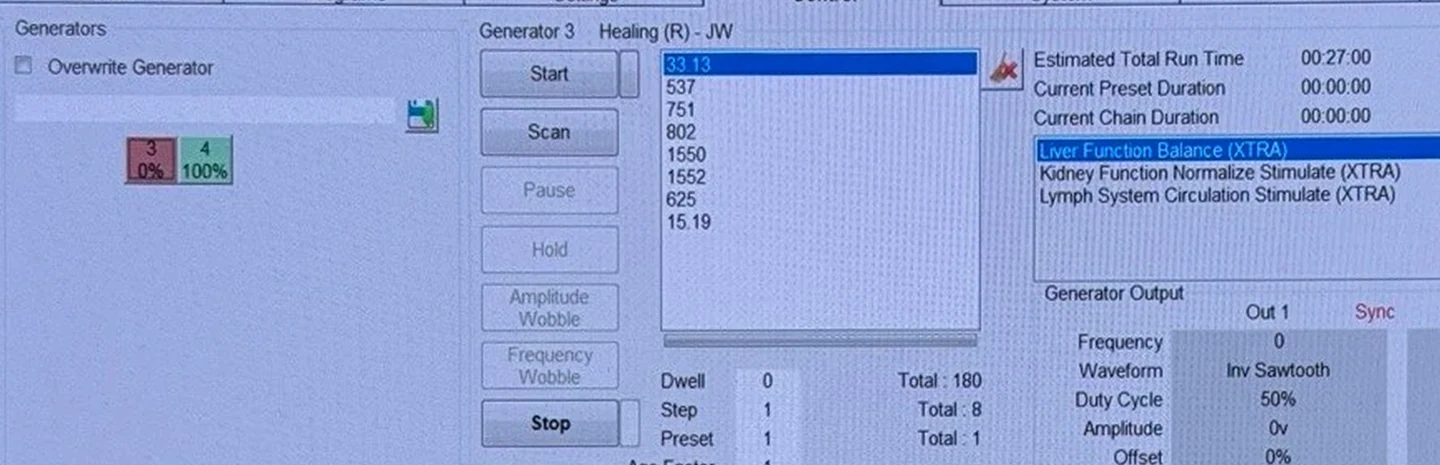
So the whole set is 8 frequencies and 27 minutes. On the Control tab, the frequency list shows all eight frequencies in that order. Beside the list, Total : 180 is the 180 seconds each frequency runs, and Total : 8 is the number of frequencies.
What's inside Lymph System Circulation Stimulate (XTRA)
- Lymph System Circulation Stimulate (XTRA) is one frequency, 15.19 Hz, for 6 minutes.
- On the Programs tab, the result line reads Lymph System Circulation Stimulate, then 6 mins, then XTRA 15.19. Basically, XTRA is the name of the Spooky2 database that Lymph System Circulation Stimulate comes from. Liver Function Balance and Kidney Function Normalize Stimulate come from XTRA too.
Why Lymph System Circulation Stimulate is the third program
Why I'd add a lymph program after the liver and kidney programs
The liver and the kidneys both help clear waste from the body (MedlinePlus on the liver, MedlinePlus on the kidneys). And the lymph system does too. The lymphatic system collects extra fluid from the body's tissues and returns it to the bloodstream, and it filters waste products out of that fluid (Cleveland Clinic on the lymphatic system). So to me, a lymph program made sense as the third program next to Liver Function Balance and Kidney Function Normalize Stimulate. Keep in mind, that's my own reasoning. Spooky2 doesn't suggest putting a liver, kidney and lymph program together anywhere.
Lymph System Circulation Stimulate is the smallest lymph program I found, at one frequency
- Lymph System Circulation Stimulate is one frequency for 6 minutes.
- Lymph System Circulation Stimulate has none of the frequencies that come up in program after program on Spooky2's lists, like 727, 787, 880 and 10000 Hz. My kidney guide shows how often 880 Hz turns up compared with a frequency like 625 Hz.
- All three programs in the set are named after a part of the body and what that part does, not after a germ. Spooky2's Smoother Healing guide says a Herx "occurs when a rapid die-off of pathogens releases toxins into the bloodstream." So by Spooky2's own explanation, programs like these three could be less likely to cause die-off reactions than programs aimed at germs.
Why not the other lymph programs
Here's what's inside the other lymph programs in Spooky2 version 20260911.
- Lymph Drain Circulation (XTRA) has 34 frequencies, including 880, 787, 727.5 and 10000 Hz, and runs about 1 hour 42 minutes.
- Lymph and Detoxification (BIO) and Lymphs and Detox (PROV) both include 880, 787, 727 and 10000 Hz.
- Detox and Lymphs, in both the CAFL and XTRA databases, includes the same 880, 787, 727 and 10000 Hz.
- Lymphangitis (CAFL) includes 880 Hz.
So each of those lymph programs is a much bigger step than Lymph System Circulation Stimulate, which is one frequency for 6 minutes.
Two other lymph programs are small too. Lymphatic System (RUSS) is 75 and 95 Hz for 6 minutes. Lymph Support (CAFL) is 15.05, 10.36 and 3176 Hz for 9 minutes. I went with Lymph System Circulation Stimulate because it's only one frequency. But Lymphatic System (RUSS) and Lymph Support (CAFL) both make a good swap later on. The "How often, and keeping the set fresh" section below shows when you could swap one of them in for Lymph System Circulation Stimulate.
What you need
- You'll need the same setup as my kidney program guide, in Remote mode. The second Boost is plugged into Out 1 and Out 2 of Generator 2 on your GeneratorX Pro, or GX Pro, which is $650 on Spooky2's store. And the second Remote is in that Boost's BN port. If you need a second Boost or a second Remote, the Boost v3.1 is $18 and the Remote v2.0 is $48 on Spooky2's store.
- You'll need fresh nail clippings in the second Remote.
- And the Schumann Resonator keeps running on Generator 1 the whole time.
I used Spooky2 version 20260911. If you haven't hooked up the second Boost and Remote yet, Part 1 of my Liver Function Balance guide shows how, and how to find which box is Generator 2.
Part 1
Stop Generator 2 before you start
- Click the Control tab. Click the Generator 2 box, which was box 3 on my setup, and click Stop if anything is running on Generator 2. Leave Generator 1, which is running the Schumann Resonator, alone.
Part 2
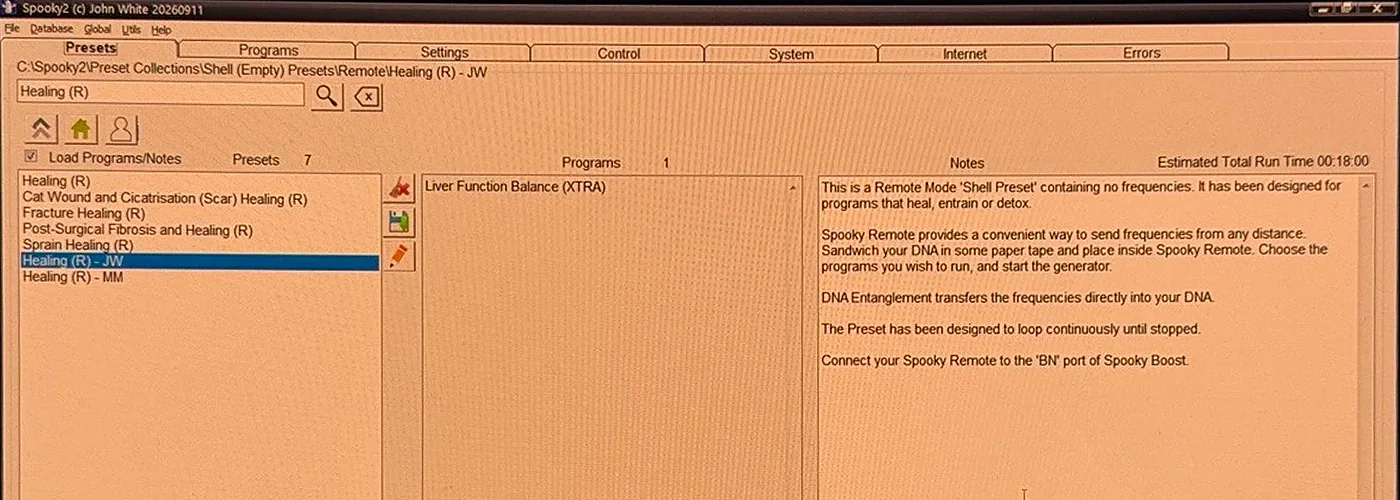
Load the empty Healing (R) - JW shell
- Click the Presets tab. Type Healing (R) - JW in the search box and click the magnifying glass. The search shows more than one Healing (R) - JW, so click each one in turn until the folder path above the search box reads ...Shell (Empty) Presets\Remote\Healing (R) - JW.
Part 3
Add the three programs in order
- Click the Programs tab. Type liver function balance in the search box, click the magnifying glass, and double-click Liver Function Balance. Check that the result line says XTRA and 18 mins.
- Type kidney function normalize in the search box, click the magnifying glass, and double-click Kidney Function Normalize Stimulate. Check that the result line says XTRA, 3 mins and 625.
- Type lymph system circulation in the search box, click the magnifying glass, and double-click Lymph System Circulation Stimulate. Check that the result line says XTRA, 6 mins and 15.19.

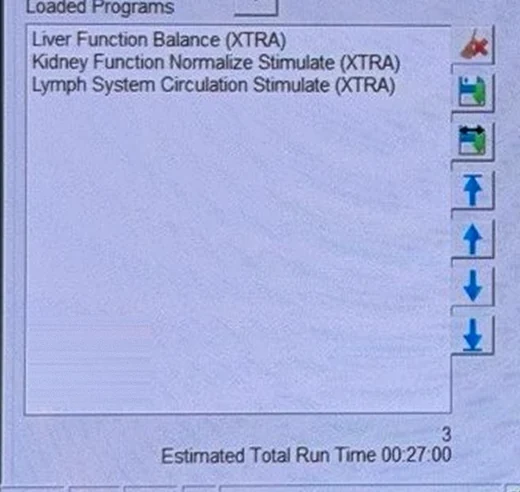
- Check Loaded Programs, at the bottom left of the Programs tab. It should list Liver Function Balance, then Kidney Function Normalize Stimulate, then Lymph System Circulation Stimulate, in that order. And Estimated Total Run Time should read 00:27:00. To fix the order, click a program and use the blue arrow buttons to the right of the Loaded Programs box. To remove a program, click it and use the red X button at the top of that column of buttons.
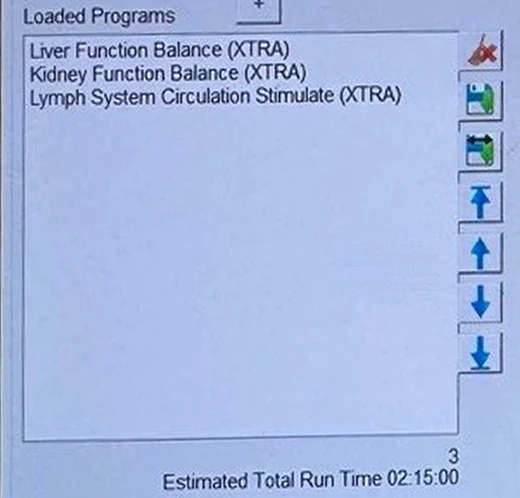
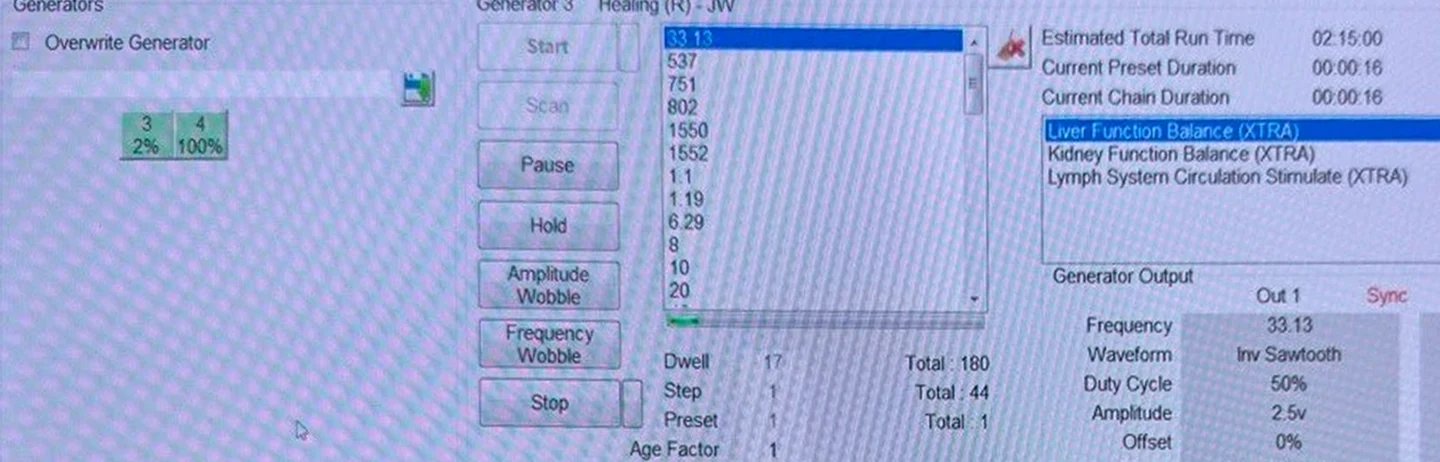
Kidney Function Balance has 37 frequencies, including 880 and 10000 Hz, and runs about 1 hour 51 minutes. So with Kidney Function Balance loaded, Estimated Total Run Time read 02:15:00 instead of 00:27:00. And the Control tab's frequency list showed 1.1, 1.19, 6.29, 8, 10 and 20 right after the six liver frequencies.
You can spot Kidney Function Balance two ways. Estimated Total Run Time should read 00:27:00, and the Control tab should show exactly 8 frequencies (Total : 8).
To fix the wrong kidney program, click Stop on Generator 2, click Kidney Function Balance under Loaded Programs, and click the red X. Then search kidney function normalize and double-click Kidney Function Normalize Stimulate. Move Kidney Function Normalize Stimulate up between Liver Function Balance and Lymph System Circulation Stimulate with the blue arrows, check for 00:27:00, and start again.
Part 4
Make the set stop after one pass
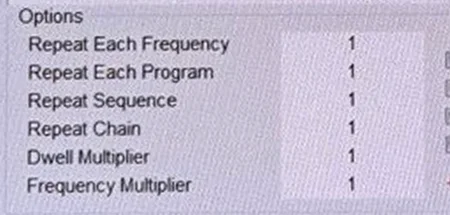
- Find the Options section, just right of the Loaded Programs box. Repeat Chain is the fourth line. Click the 0 next to Repeat Chain, type 1, and press Tab on your keyboard.
Part 5
Turn the voltage down to 2.5 V
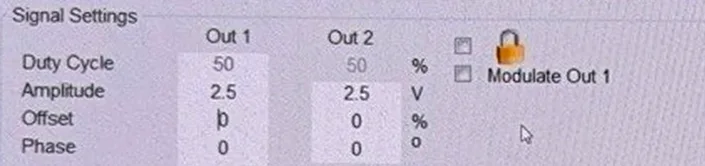
- Click the Settings tab. Look at the top left, under Signal Settings. The Amplitude row is just under Duty Cycle. Change Out 1 to 2.5 and press Tab. Then change Out 2 to 2.5 and press Tab.
Part 6
Start the set on Generator 2
- Click the Control tab. Tick Overwrite Generator, click the Generator 2 box, then click Start. Start is the top button, and Scan is directly below it.
- Check Generator Output. It should show frequency 33.13, the first liver frequency, and amplitude 2.5v. After about 27 minutes, the Generator 2 box should reach 100% and stop. If the Generator 2 box starts over, click Stop and check that Repeat Chain is 1.
- Once the set runs and stops after one pass, save it as your own preset, so you can load it in one click instead of rebuilding it every day. My guide How to save your own Spooky2 preset shows every click, using this daily set as the example.
How often, and keeping the set fresh
- Run the set once a day. If you've saved the set as your own preset, load your preset from the User folder, start it on Generator 2 the way Part 6 shows, and check that the voltage is 2.5 V and Repeat Chain is 1. If you haven't, repeat Parts 2 to 6 each day: load the empty Healing (R) - JW shell, add the three programs, and set Repeat Chain to 1 and the voltage to 2.5 V again. The empty Healing (R) - JW shell comes back at 10 V and Repeat Chain 0 every time you load it.
- Take one day off each week from the set, and keep the Schumann Resonator running on that day.
- Every few weeks, swap the lymph program for another small lymph program. For example, put Lymphatic System (RUSS) or Lymph Support (CAFL) in third place instead of Lymph System Circulation Stimulate.
- Drink plenty of water. Kidney Function Normalize Stimulate's own note in Spooky2 says "Drink lots of pure water."
I suggest the day off and the swap because of something some Spooky2 users call "frequency fatigue". They tie frequency fatigue to running one frequency for a very long time, and a 27-minute set once a day is a long way from that.
So for me personally, the day off and the swap are just two easy habits, not a fix for a problem anyone has shown. Keep in mind, frequency fatigue comes from user reports, not research.
What to watch for, and what to do
Going well means you feel the same as you did on the 21-minute liver and kidney set. Keep a short note each day with the date, what ran and the voltage, and how you felt that evening and the next morning.
Not going well could look like the reaction signs Spooky2 lists: flu-like feelings, skin itching or breakouts, and fatigue. They're the same signs I cover in my Liver Function Balance guide.
Here's what I'd do if you notice those signs:
- Stop the daily set on Generator 2.
- Keep the Schumann Resonator running on Generator 1, the same as before.
- Wait until you feel back to normal, and drink plenty of water.
- Then try the set again at 1 V instead of 2.5 V. Or keep 2.5 V and run the set every other day.
And keep in mind, if you have severe or unusual symptoms, get checked by a doctor rather than pushing through.
If something on the Spooky2 screen looks wrong along the way, my Spooky2 troubleshooting page covers the problems I've hit and how to fix each one.
So ultimately, the daily set is Liver Function Balance, Kidney Function Normalize Stimulate and Lymph System Circulation Stimulate in one Healing (R) - JW shell on your second Remote at 2.5 V. It's 8 frequencies and 27 minutes, once a day. And hopefully this makes running all three programs together a little easier.
Sources
- Cleveland Clinic, "Lymphatic System": what the lymphatic system does with extra fluid and waste products.
- MedlinePlus (U.S. National Library of Medicine): Liver Diseases and Kidney Diseases, for what the liver and kidneys do.
- Spooky2 help center: "What frequencies can strengthen the kidney and liver?": Kidney Function Normalize Stimulate and Liver Function Balance in a Healing shell preset.
- "Smoother Healing: How to Manage Herx Reactions" (Spooky2 blog, 2026): how Spooky2 explains Herx reactions, and the reaction signs.
- Spooky2 help center, user answer on frequency fatigue: frequency fatigue tied to one frequency run for a very long time.
- Program list read from a Spooky2 20260911 install: Liver Function Balance (XTRA), Kidney Function Normalize Stimulate (XTRA), Kidney Function Balance (XTRA), Lymph System Circulation Stimulate (XTRA), Lymph Drain Circulation (XTRA), Lymph and Detoxification (BIO), Lymphs and Detox (PROV), Detox and Lymphs (CAFL and XTRA), Lymphangitis (CAFL), Lymphatic System (RUSS) and Lymph Support (CAFL).
- Spooky2 store pages for the GeneratorX Pro, Boost v3.1 and Remote v2.0.
- Spooky2 software, version 20260911, available on the Spooky2 downloads page: the steps and screenshots on this page.
My take
Check for 00:27:00 before you click Start. Kidney Function Balance has almost the same name as Kidney Function Normalize Stimulate, and loading it by mistake turns the set into 2 hours 15 minutes.
Set Repeat Chain and the voltage every time you load the shell. If you have any questions, feel free to email me at contact@biofrequencybuddy.com. I look forward to reading as many messages as I can, and your questions help me improve these guides.